> ## Documentation Index
> Fetch the complete documentation index at: https://paper.brimble.io/llms.txt
> Use this file to discover all available pages before exploring further.
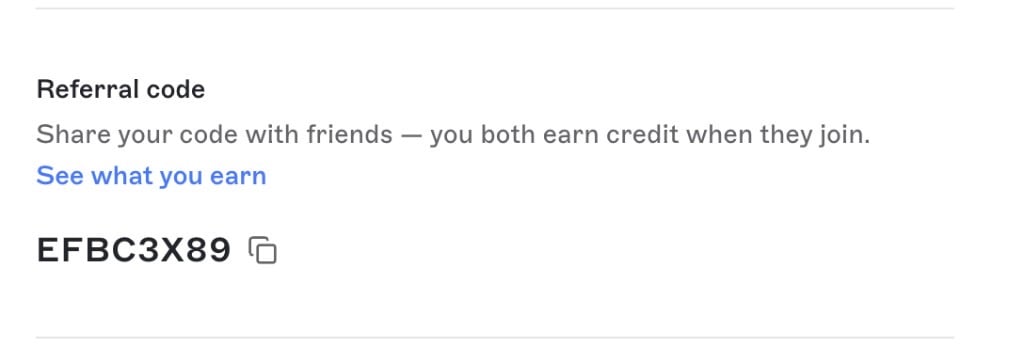
# Referrals
> Share your Brimble referral code. When someone you referred starts a paid plan, you get a free domain credit and 25% off your next invoice.
Every Brimble account has a unique referral code. Share it. When a person who used your code starts a paid plan, **you** get the rewards. Signing up on Free is not enough.
## Find your code
1. Open the dashboard.
2. Click your avatar in the sidebar to open the profile drawer.
3. Copy the **Referral code** with the copy icon next to it.
The code is assigned to your account and does not change. **See what you earn** opens this page.
 ## What you earn
Each rewarded conversion grants both of these, together:
| Reward | What it is |
| -------------------- | ----------------------------------------------------------------------------------------------------------------------------------------------------------------------- |
| **Domain credit** | 100% off one domain whose setup price is **\$7 or less**. Applied automatically at [checkout](/domains/buy-a-domain). WHOIS privacy is still charged if you turn it on. |
| **Invoice discount** | **25% off** your next personal or team plan invoice, once. |
You can earn this pair up to **5 times**. After that, more people can still use your code, but you do not get more credits.
Rewards do not go to the person who used the code.
## When a conversion counts
A conversion happens on that person's **first** paid plan, not on signup, and not when they later switch plans.
These count:
* Starting **Hacker**
* Starting **Developer** (paid, not a trial)
* Starting **Team**
These do not:
* Staying on **Free**
* Starting a **Developer trial**. Rewards wait until they become a paying subscriber
* Buying or renewing a domain (a domain subscription is not a plan conversion)
* Changing from one paid plan to another after they are already converted
If they already have a paid plan when they attach your code, the conversion can happen immediately.
You get an email when someone uses your code, and another email when the rewards are granted.
## Using a domain credit
Open **Domains → Buy a domain** and check out as usual. If you have a domain credit and the domain's setup price is \$7 or less, Brimble applies the credit and does not charge for that domain.
A coupon code on the purchase wins. If you enter a coupon, the referral credit is left unused.
If the purchase does not complete (payment or registration fails), the credit is put back on your account.
Renewals are billed at the domain's renewal price. A referral credit does not cover later years.
See [Buy a domain](/domains/buy-a-domain).
## Using the invoice discount
The 25% discount applies to the next invoice on a paid **Hacker**, **Developer**, or **Team** subscription.
Brimble prefers your personal paid subscription. If you do not have one, it uses your newest paid team subscription. It is not applied to domain renewals.
If that subscription already has a discount, the referral discount waits and applies on a later invoice once the other discount is gone. If you do not have a paid subscription yet, the discount waits until you do.
## Using someone's code
A code can be attached to an account that does not already have one. Once attached, it cannot be changed. You cannot use your own code.
Signing up with GitHub, GitLab, Google, or Bitbucket does not attach a referral code.
## Next steps
* [How billing works](/billing/plans), plans, trials, and invoices.
* [Buy a domain](/domains/buy-a-domain), where a domain credit is applied.
## What you earn
Each rewarded conversion grants both of these, together:
| Reward | What it is |
| -------------------- | ----------------------------------------------------------------------------------------------------------------------------------------------------------------------- |
| **Domain credit** | 100% off one domain whose setup price is **\$7 or less**. Applied automatically at [checkout](/domains/buy-a-domain). WHOIS privacy is still charged if you turn it on. |
| **Invoice discount** | **25% off** your next personal or team plan invoice, once. |
You can earn this pair up to **5 times**. After that, more people can still use your code, but you do not get more credits.
Rewards do not go to the person who used the code.
## When a conversion counts
A conversion happens on that person's **first** paid plan, not on signup, and not when they later switch plans.
These count:
* Starting **Hacker**
* Starting **Developer** (paid, not a trial)
* Starting **Team**
These do not:
* Staying on **Free**
* Starting a **Developer trial**. Rewards wait until they become a paying subscriber
* Buying or renewing a domain (a domain subscription is not a plan conversion)
* Changing from one paid plan to another after they are already converted
If they already have a paid plan when they attach your code, the conversion can happen immediately.
You get an email when someone uses your code, and another email when the rewards are granted.
## Using a domain credit
Open **Domains → Buy a domain** and check out as usual. If you have a domain credit and the domain's setup price is \$7 or less, Brimble applies the credit and does not charge for that domain.
A coupon code on the purchase wins. If you enter a coupon, the referral credit is left unused.
If the purchase does not complete (payment or registration fails), the credit is put back on your account.
Renewals are billed at the domain's renewal price. A referral credit does not cover later years.
See [Buy a domain](/domains/buy-a-domain).
## Using the invoice discount
The 25% discount applies to the next invoice on a paid **Hacker**, **Developer**, or **Team** subscription.
Brimble prefers your personal paid subscription. If you do not have one, it uses your newest paid team subscription. It is not applied to domain renewals.
If that subscription already has a discount, the referral discount waits and applies on a later invoice once the other discount is gone. If you do not have a paid subscription yet, the discount waits until you do.
## Using someone's code
A code can be attached to an account that does not already have one. Once attached, it cannot be changed. You cannot use your own code.
Signing up with GitHub, GitLab, Google, or Bitbucket does not attach a referral code.
## Next steps
* [How billing works](/billing/plans), plans, trials, and invoices.
* [Buy a domain](/domains/buy-a-domain), where a domain credit is applied.