> ## Documentation Index
> Fetch the complete documentation index at: https://paper.brimble.io/llms.txt
> Use this file to discover all available pages before exploring further.
# Log Drains
> Brimble Log Drains forward a project's logs in real time to an external HTTPS endpoint or S3-compatible bucket.
Brimble Log Drains forward a project's logs in real time to an external HTTPS endpoint or S3-compatible bucket, like Datadog, Axiom, Better Stack, AWS S3, R2, or MinIO. Logs are sent as gzipped NDJSON.
## Prerequisites
* A project deployed on Brimble.
* A Brimble plan that includes Log Drains.
* A destination ready to receive logs: an HTTPS endpoint, or an S3-compatible bucket.
## Create a drain
1. Open **Settings** and go to the **Log Drains** tab.
2. Click **Add drain**.
3. Choose a destination type: **HTTPS endpoint** or **S3-compatible bucket**.
4. Choose the sources to forward: **app logs**, **system events**, **HTTP request logs**.
5. Enter the destination details and save.
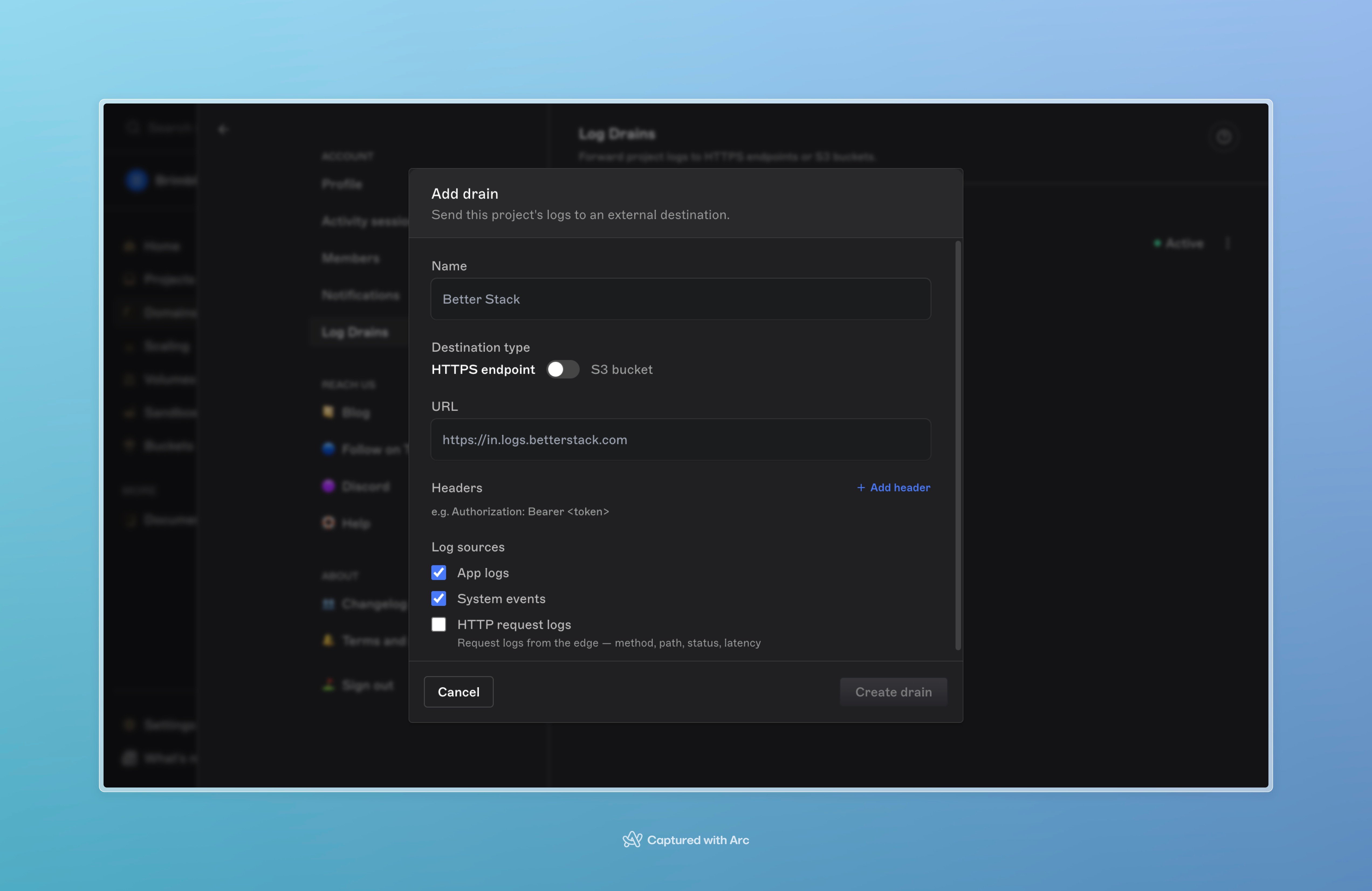 A drain is created once, at the account level.
## Subscribe a project
A drain doesn't forward anything until a project subscribes to it.
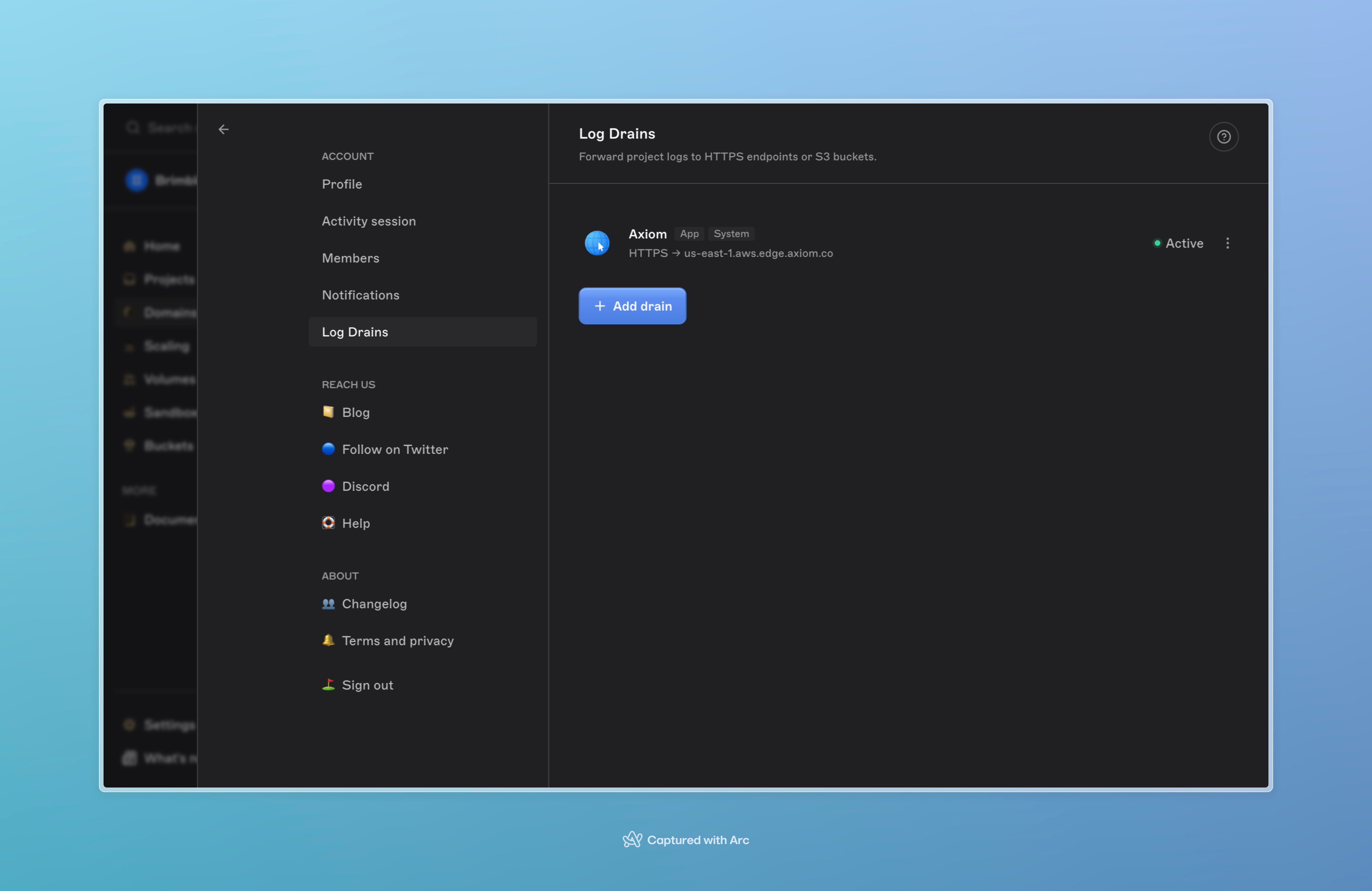
1. Open the project.
2. Go to its **Log Drains** page.
3. Enable the drain to subscribe.
A project only sends logs to the drains it's subscribed to. The same drain can be subscribed across multiple projects instead of being recreated per project.
A drain is created once, at the account level.
## Subscribe a project
A drain doesn't forward anything until a project subscribes to it.
1. Open the project.
2. Go to its **Log Drains** page.
3. Enable the drain to subscribe.
A project only sends logs to the drains it's subscribed to. The same drain can be subscribed across multiple projects instead of being recreated per project.
 ## Delivery semantics
* **Best-effort delivery.** If a destination is down, that drain's events queue in a bounded buffer; delivery to other drains isn't affected.
* **Not a durable queue.** If a destination stays broken, new events for that drain are dropped once the buffer fills.
* **Auto-disabled after prolonged failure.** A drain that fails continuously for 24 hours is automatically disabled, and an email is sent.
* **No ordering guarantee across instances.** A project running multiple containers ships logs from each independently. Use the event timestamp, not arrival order.
* **No backfill.** A drain forwards only logs created after it's created; historical logs aren't replayed into it.
## Pricing
Log Drains are included on paid plans, with no per-GB fee.
## Troubleshooting
**No logs arriving at the destination.** Confirm the project is subscribed to the drain — drains created at the account level don't forward anything until a project enables them.
**Drain shows as disabled.** It likely failed continuously for 24 hours. Confirm the destination is reachable, then re-enable the drain.
**Some sources missing, others arriving.** Check which sources (app logs, system events, HTTP request logs) are enabled on the drain.
## Next steps
* [Logs](/observability/logs), for viewing logs directly in the dashboard.
* [Webhooks](/webhooks/overview), for event-based notifications instead of a continuous log stream.
## Delivery semantics
* **Best-effort delivery.** If a destination is down, that drain's events queue in a bounded buffer; delivery to other drains isn't affected.
* **Not a durable queue.** If a destination stays broken, new events for that drain are dropped once the buffer fills.
* **Auto-disabled after prolonged failure.** A drain that fails continuously for 24 hours is automatically disabled, and an email is sent.
* **No ordering guarantee across instances.** A project running multiple containers ships logs from each independently. Use the event timestamp, not arrival order.
* **No backfill.** A drain forwards only logs created after it's created; historical logs aren't replayed into it.
## Pricing
Log Drains are included on paid plans, with no per-GB fee.
## Troubleshooting
**No logs arriving at the destination.** Confirm the project is subscribed to the drain — drains created at the account level don't forward anything until a project enables them.
**Drain shows as disabled.** It likely failed continuously for 24 hours. Confirm the destination is reachable, then re-enable the drain.
**Some sources missing, others arriving.** Check which sources (app logs, system events, HTTP request logs) are enabled on the drain.
## Next steps
* [Logs](/observability/logs), for viewing logs directly in the dashboard.
* [Webhooks](/webhooks/overview), for event-based notifications instead of a continuous log stream.