> ## Documentation Index
> Fetch the complete documentation index at: https://paper.brimble.io/llms.txt
> Use this file to discover all available pages before exploring further.
# Static outbound IPs
> Give a project a fixed, predictable set of outbound IP addresses so you can allowlist it at a bank, payment processor, or third-party API.
By default, a project's outbound IP is **not published** and can change when the project is rescheduled onto another host. That's fine for most outbound calls. Banks, payment processors, and some partner APIs require a **fixed** IP on their allowlist before they'll accept traffic from you.
**Static outbound IPs** is that contract. Turn it on for a project and outbound traffic leaves through a small, stable set of addresses for that project's regional pool. Those are the only addresses we show you to allowlist.
 ## How it works
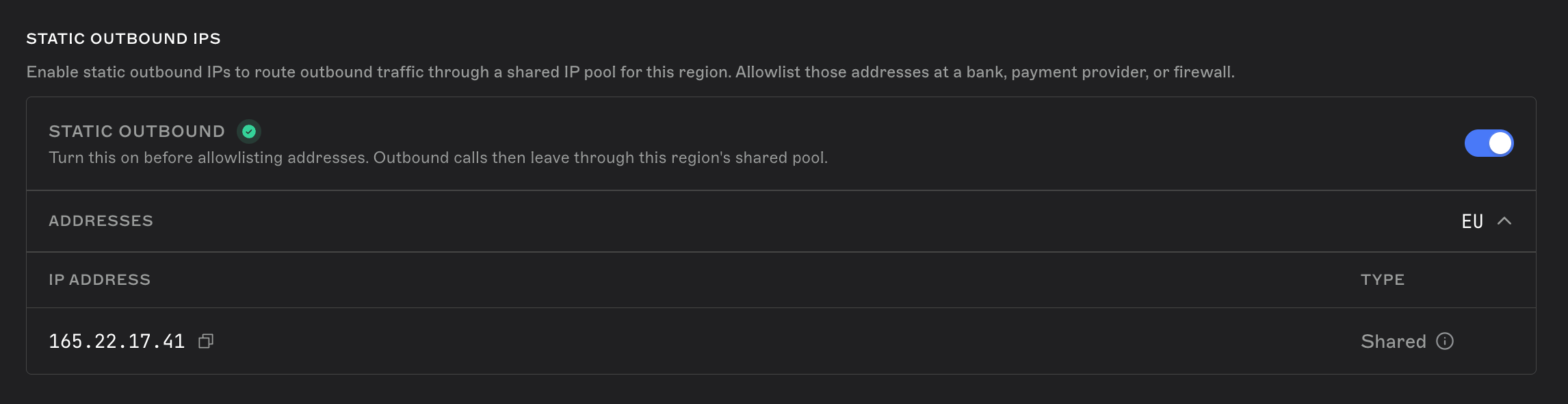
Static outbound IPs is an **opt-in, per-project** setting. When you enable it, Brimble routes that project's outbound traffic through its **regional pool** and lists the pool's outbound IP addresses in the dashboard.
A few things worth understanding upfront:
* **The IPs are shared per pool, not unique per project.** Every project in the same regional pool that has static outbound IPs enabled shares the same small set of outbound IPs. You don't get an IP that's exclusive to your project. You get one that's stable and known ahead of time.
* **Pools are regional.** A project's pool is determined by the region it's deployed in. Projects in Europe share the EU pool's IPs; other continents get their own pool as they come online (see [Availability](#availability) below).
* **This only affects outbound traffic.** It has no effect on your project's inbound traffic, its `*.brimble.app` URL, or any custom domains you've connected. Those are handled separately. See [Custom domains](/domains/custom-domains) and [Networking and the edge](/networking/overview).
* **Without it, we do not publish an outbound IP.** Don't allowlist an address you observed from the project. It is not a contract and it can change.
## Availability
Static outbound IPs is a **plan feature**, not a blanket paid-plan perk. It's included only when your plan's configuration turns it on. Check the feature list on the [pricing page](https://brimble.io/pricing) or under **Billing** in the dashboard. If you don't see the setting on a project, it isn't available for your plan or account yet.
The feature rolls out pool by pool:
| Pool | Regions | Status |
| ----------------- | ---------------------------------------------------------- | ----------- |
| **Europe (EU)** | Frankfurt, Helsinki, Nuremberg, and other European regions | Live |
| **Africa (NG)** | Africa regions | Coming soon |
| **Americas (US)** | US regions | Coming soon |
| **Asia** | Singapore and other Asia regions | Coming soon |
If your project's region doesn't have a live pool, enable fails until that pool is provisioned.
## Pricing
Static outbound IPs costs **\$5 per project, per month**. You're only charged for projects you've turned it on for.
It is a **licensed line item on your existing Hacker, Developer, or Team invoice**, not a separate subscription. The invoice lists it as **Dedicated outbound IPs**. Quantity is the number of projects with the feature on. Mid-cycle enable or disable **prorates** onto the next invoice.
The first enable requires a default payment method on the billing owner. If that charge can't be applied, the feature stays off. See [How billing works](/billing/plans).
Static outbound IPs is separate from ordinary outbound traffic. Without this feature, outbound addresses are unpublished and can change. Enabling it is what makes a small set of addresses stable and safe to allowlist.
## Enable static outbound IPs
### Step 1: Open your project's settings
From your project's dashboard, go to **Settings** and find the **Static outbound IPs** section.
### Step 2: Turn it on
Toggle **Static outbound IPs** on. Brimble starts routing that project's outbound traffic through its regional pool.
## How it works
Static outbound IPs is an **opt-in, per-project** setting. When you enable it, Brimble routes that project's outbound traffic through its **regional pool** and lists the pool's outbound IP addresses in the dashboard.
A few things worth understanding upfront:
* **The IPs are shared per pool, not unique per project.** Every project in the same regional pool that has static outbound IPs enabled shares the same small set of outbound IPs. You don't get an IP that's exclusive to your project. You get one that's stable and known ahead of time.
* **Pools are regional.** A project's pool is determined by the region it's deployed in. Projects in Europe share the EU pool's IPs; other continents get their own pool as they come online (see [Availability](#availability) below).
* **This only affects outbound traffic.** It has no effect on your project's inbound traffic, its `*.brimble.app` URL, or any custom domains you've connected. Those are handled separately. See [Custom domains](/domains/custom-domains) and [Networking and the edge](/networking/overview).
* **Without it, we do not publish an outbound IP.** Don't allowlist an address you observed from the project. It is not a contract and it can change.
## Availability
Static outbound IPs is a **plan feature**, not a blanket paid-plan perk. It's included only when your plan's configuration turns it on. Check the feature list on the [pricing page](https://brimble.io/pricing) or under **Billing** in the dashboard. If you don't see the setting on a project, it isn't available for your plan or account yet.
The feature rolls out pool by pool:
| Pool | Regions | Status |
| ----------------- | ---------------------------------------------------------- | ----------- |
| **Europe (EU)** | Frankfurt, Helsinki, Nuremberg, and other European regions | Live |
| **Africa (NG)** | Africa regions | Coming soon |
| **Americas (US)** | US regions | Coming soon |
| **Asia** | Singapore and other Asia regions | Coming soon |
If your project's region doesn't have a live pool, enable fails until that pool is provisioned.
## Pricing
Static outbound IPs costs **\$5 per project, per month**. You're only charged for projects you've turned it on for.
It is a **licensed line item on your existing Hacker, Developer, or Team invoice**, not a separate subscription. The invoice lists it as **Dedicated outbound IPs**. Quantity is the number of projects with the feature on. Mid-cycle enable or disable **prorates** onto the next invoice.
The first enable requires a default payment method on the billing owner. If that charge can't be applied, the feature stays off. See [How billing works](/billing/plans).
Static outbound IPs is separate from ordinary outbound traffic. Without this feature, outbound addresses are unpublished and can change. Enabling it is what makes a small set of addresses stable and safe to allowlist.
## Enable static outbound IPs
### Step 1: Open your project's settings
From your project's dashboard, go to **Settings** and find the **Static outbound IPs** section.
### Step 2: Turn it on
Toggle **Static outbound IPs** on. Brimble starts routing that project's outbound traffic through its regional pool.
 ### Step 3: Copy the outbound IPs
Once enabled, the panel lists the outbound IP addresses for your project's pool. The list is empty while the feature is off.
Copy **all** of them. Third parties typically want the full list allowlisted, not just one address. The EU pool currently has a single shared address; other pools may list more than one.
### Step 4: Allowlist the IPs at your destination
Add the IPs to your bank's, payment processor's, or partner API's allowlist, following their process for adding trusted IPs.
Traffic starts leaving through the new path shortly after you enable it — typically seconds, not minutes. Until those IPs are allowlisted at the destination, calls may still be rejected on their end.
## Disable static outbound IPs
Toggle the setting off from the same panel. Outbound traffic immediately stops using the pool addresses. Existing in-flight connections may finish on the old path before switching over. The dashboard clears the IP list.
If you disable static outbound IPs, any allowlist entries you set up at a third party stop matching your project's traffic. Remove or update the allowlist on their end if you no longer need it, or re-enable the feature if you turned it off by mistake and still need the same IPs.
## Changing regions
Because the outbound IPs are tied to your project's regional pool, moving a project to a region in a different pool changes its outbound IPs. If you move a project after allowlisting its old IPs at a third party, update that allowlist with the new pool's IPs after the move. See [Change a project's region](/projects/regions#change-a-projects-region).
## Frequently asked questions
**Do I get an IP address that's unique to my project?**
No. The outbound IPs are shared across every project in the same regional pool that has static outbound IPs enabled. They're stable and predictable, which is what allowlisting needs, but they aren't exclusive to a single project.
**Will the outbound IPs ever change?**
They can, for example if Brimble replaces infrastructure behind a pool. That is uncommon. When it happens, the dashboard shows the new addresses. Update any allowlists to match.
**My region isn't listed. Can I still get static outbound IPs?**
Not yet. The feature is rolling out one regional pool at a time, starting with Europe. If your project is in a region without a live pool, the setting won't complete until that pool is ready. Reach out to support if you need it sooner.
## Next steps
* [How billing works](/billing/plans), how add-on charges like this fit into your invoice.
* [Custom domains](/domains/custom-domains), pointing your own domain at a project (inbound, unaffected by this feature).
* [Regions](/projects/regions), how region selection affects your project, including outbound traffic.
* [Networking and the edge](/networking/overview), how inbound traffic reaches your service.
### Step 3: Copy the outbound IPs
Once enabled, the panel lists the outbound IP addresses for your project's pool. The list is empty while the feature is off.
Copy **all** of them. Third parties typically want the full list allowlisted, not just one address. The EU pool currently has a single shared address; other pools may list more than one.
### Step 4: Allowlist the IPs at your destination
Add the IPs to your bank's, payment processor's, or partner API's allowlist, following their process for adding trusted IPs.
Traffic starts leaving through the new path shortly after you enable it — typically seconds, not minutes. Until those IPs are allowlisted at the destination, calls may still be rejected on their end.
## Disable static outbound IPs
Toggle the setting off from the same panel. Outbound traffic immediately stops using the pool addresses. Existing in-flight connections may finish on the old path before switching over. The dashboard clears the IP list.
If you disable static outbound IPs, any allowlist entries you set up at a third party stop matching your project's traffic. Remove or update the allowlist on their end if you no longer need it, or re-enable the feature if you turned it off by mistake and still need the same IPs.
## Changing regions
Because the outbound IPs are tied to your project's regional pool, moving a project to a region in a different pool changes its outbound IPs. If you move a project after allowlisting its old IPs at a third party, update that allowlist with the new pool's IPs after the move. See [Change a project's region](/projects/regions#change-a-projects-region).
## Frequently asked questions
**Do I get an IP address that's unique to my project?**
No. The outbound IPs are shared across every project in the same regional pool that has static outbound IPs enabled. They're stable and predictable, which is what allowlisting needs, but they aren't exclusive to a single project.
**Will the outbound IPs ever change?**
They can, for example if Brimble replaces infrastructure behind a pool. That is uncommon. When it happens, the dashboard shows the new addresses. Update any allowlists to match.
**My region isn't listed. Can I still get static outbound IPs?**
Not yet. The feature is rolling out one regional pool at a time, starting with Europe. If your project is in a region without a live pool, the setting won't complete until that pool is ready. Reach out to support if you need it sooner.
## Next steps
* [How billing works](/billing/plans), how add-on charges like this fit into your invoice.
* [Custom domains](/domains/custom-domains), pointing your own domain at a project (inbound, unaffected by this feature).
* [Regions](/projects/regions), how region selection affects your project, including outbound traffic.
* [Networking and the edge](/networking/overview), how inbound traffic reaches your service.