> ## Documentation Index
> Fetch the complete documentation index at: https://paper.brimble.io/llms.txt
> Use this file to discover all available pages before exploring further.
# Buckets
> Create, configure, and delete buckets. Manage CORS rules for browser access.
A **bucket** is a named container for objects in a single region. It's the unit of access control, CORS, and the smallest thing you can hand a credential to.
## Prerequisites
* A paid plan. Object storage isn't available on the Free tier.
* A workspace context. Buckets belong to the workspace you create them under (personal or team).
## Create a bucket
### From the dashboard
1. Open the dashboard.
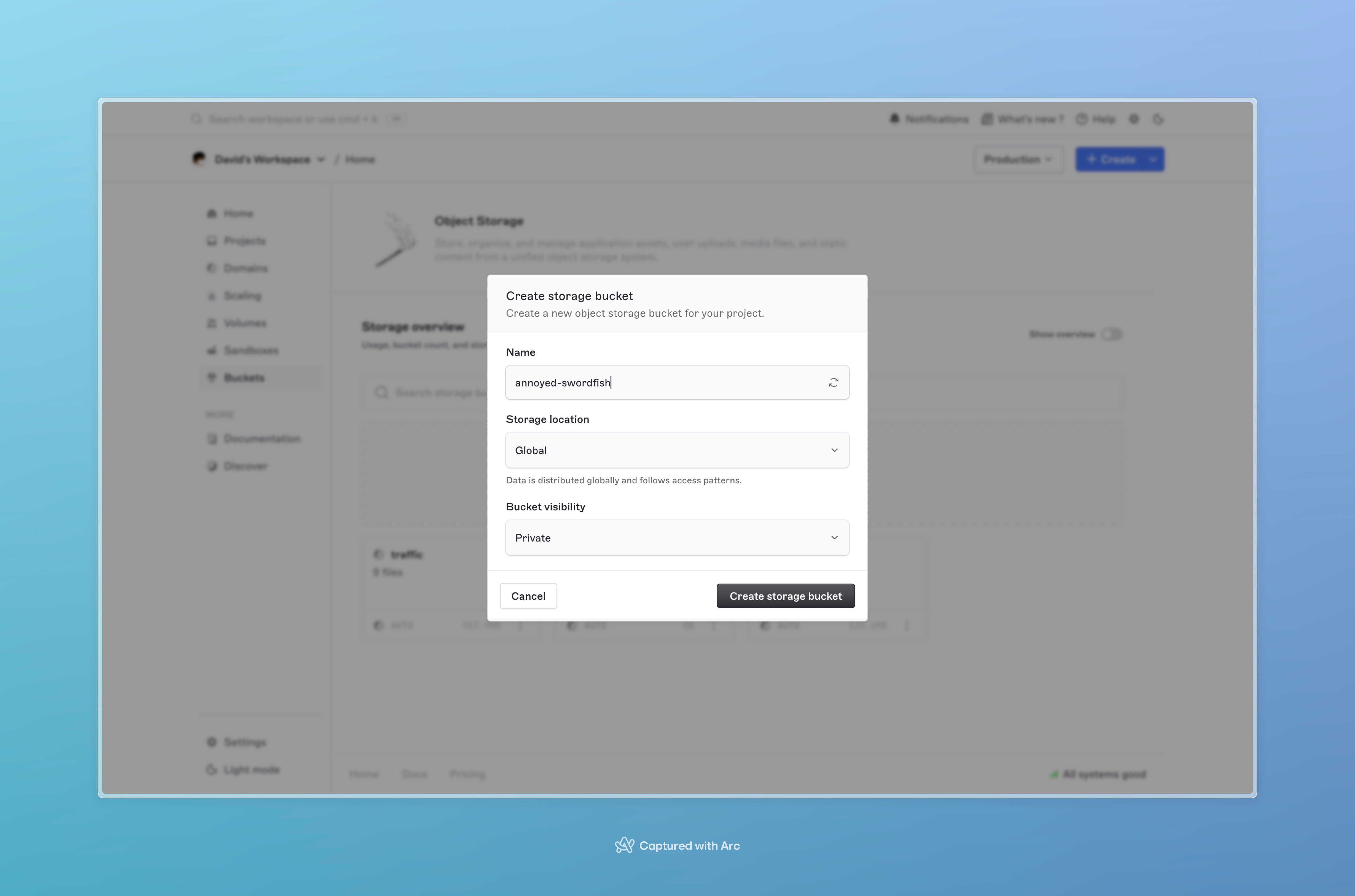
2. Go to **Object storage → Buckets** and click **New bucket**.
3. Pick a **name**. Lowercase letters, digits, and dashes; minimum 3 characters. Names are slugified on save (`My Cool Bucket` becomes `my-cool-bucket`).
4. Pick a **region**. This is permanent; you can't move a bucket between regions later, you can only migrate the contents.
5. Click **Create**. The bucket is ready immediately.
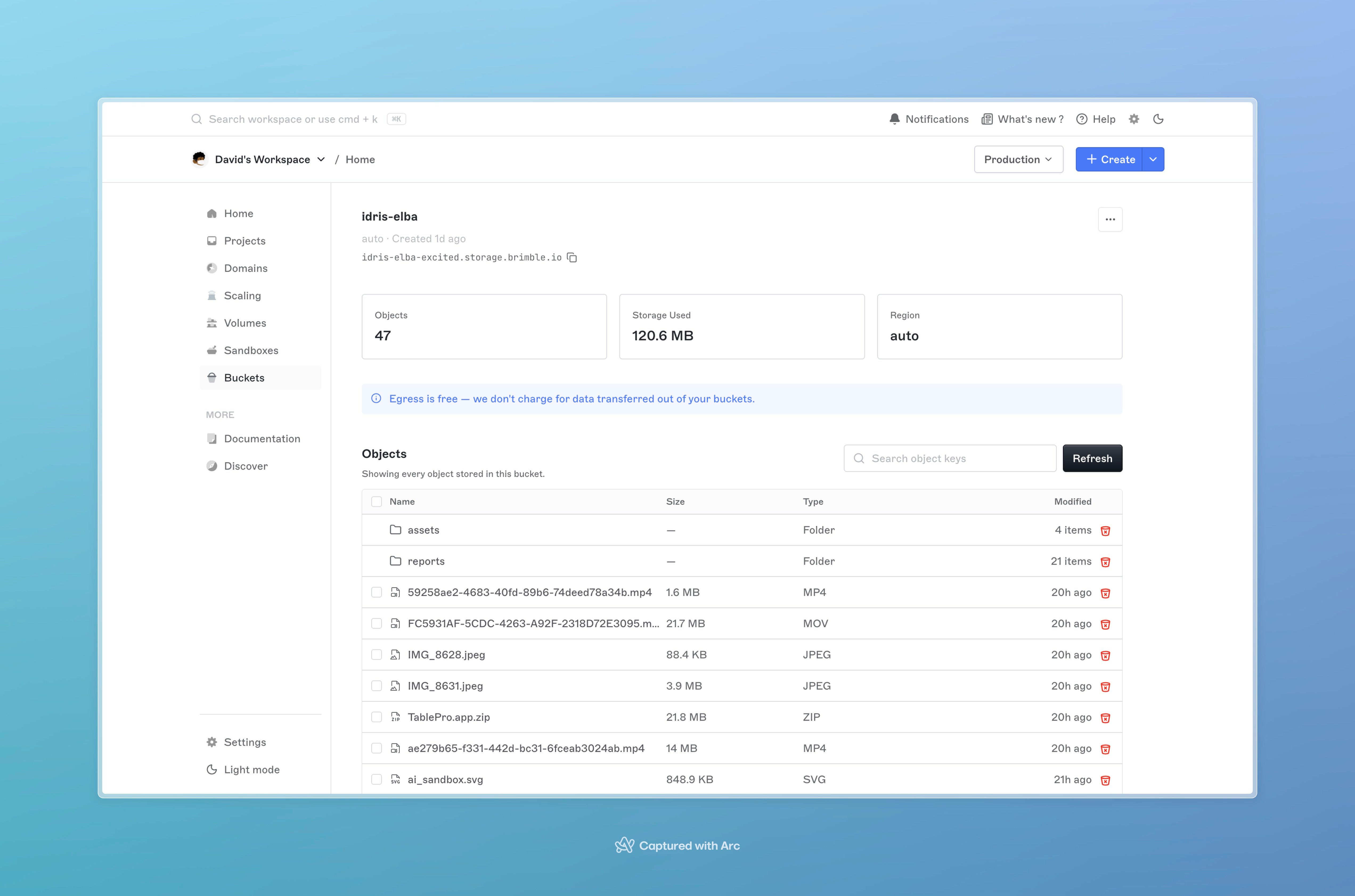
 Once created, the bucket detail page shows the **endpoint URL** and **region** you'll pass to S3 clients.
 ## List buckets
The **Buckets** tab lists every bucket in the current workspace with its region, object count, and total size. Click a bucket to open its detail page.
For programmatic listing, paginated with `page` and `limit` (max 100), and a `q` query parameter for name search.
## What's fixed at creation
A bucket's **name** and **region** are permanent. Neither can be changed after the bucket is created, the name is the path component every S3 URL embeds, and the region pins where the data physically lives.
If you need a different name or a different region, create a new bucket and [migrate](/object-storage/migrate) the data over, then delete the old one. Object keys (the part after the bucket name) carry over unchanged.
What you can change post-creation:
* **CORS rules** (see below).
* **Credentials** issued against the bucket. See [Storage credentials](/object-storage/credentials).
* **Object data**. See [Working with objects](/object-storage/objects).
## CORS rules
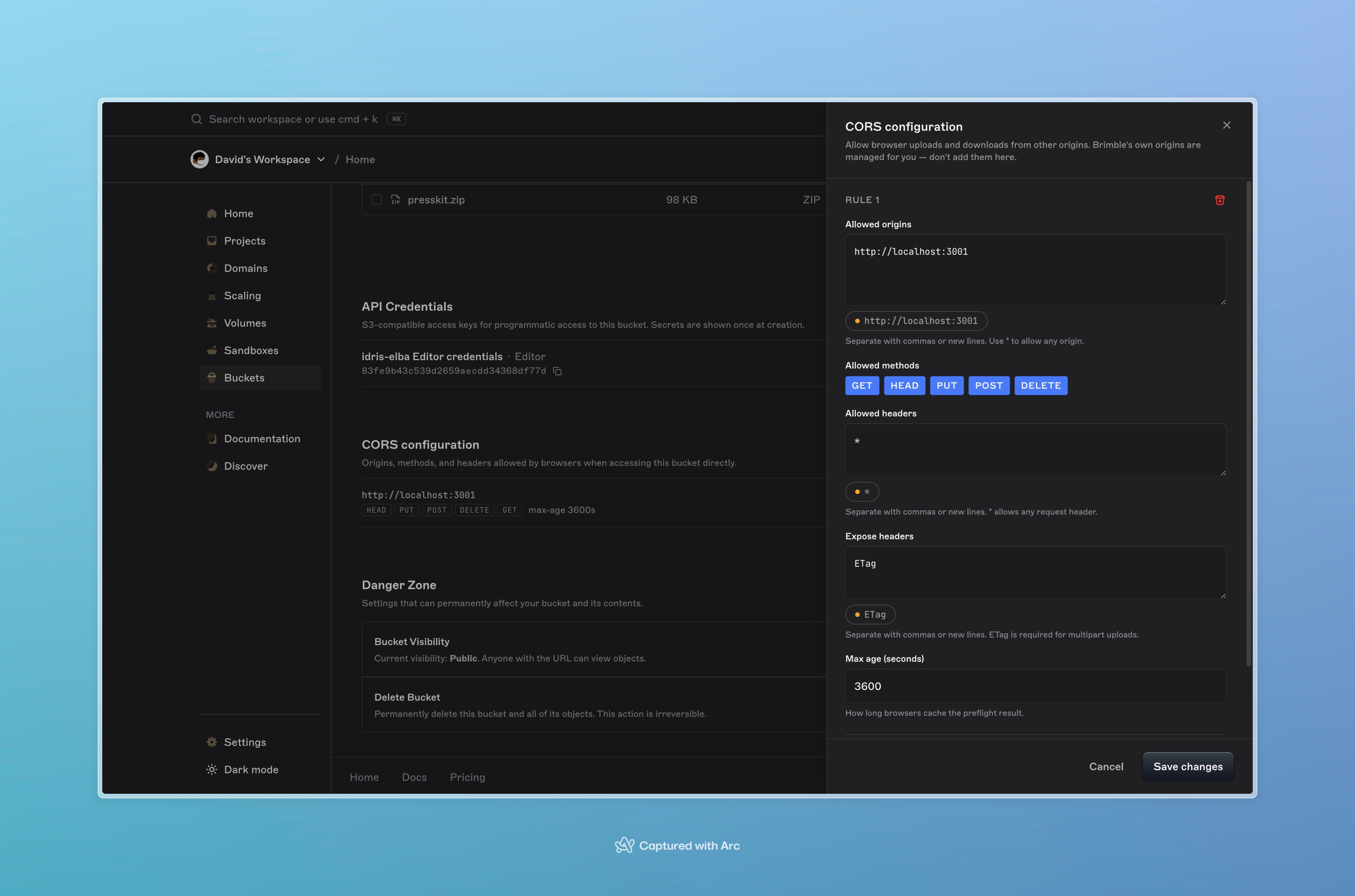
If you upload to or read from a bucket directly from a browser (presigned URLs in a single-page app, file-picker uploads, direct video playback), the browser will check the bucket's CORS configuration before issuing requests from your domain.
Open **Object storage → Buckets → \ → CORS** and add rules. Each rule is a list of allowed origins, methods, headers, and an optional `maxAgeSeconds` for the browser preflight cache.
## List buckets
The **Buckets** tab lists every bucket in the current workspace with its region, object count, and total size. Click a bucket to open its detail page.
For programmatic listing, paginated with `page` and `limit` (max 100), and a `q` query parameter for name search.
## What's fixed at creation
A bucket's **name** and **region** are permanent. Neither can be changed after the bucket is created, the name is the path component every S3 URL embeds, and the region pins where the data physically lives.
If you need a different name or a different region, create a new bucket and [migrate](/object-storage/migrate) the data over, then delete the old one. Object keys (the part after the bucket name) carry over unchanged.
What you can change post-creation:
* **CORS rules** (see below).
* **Credentials** issued against the bucket. See [Storage credentials](/object-storage/credentials).
* **Object data**. See [Working with objects](/object-storage/objects).
## CORS rules
If you upload to or read from a bucket directly from a browser (presigned URLs in a single-page app, file-picker uploads, direct video playback), the browser will check the bucket's CORS configuration before issuing requests from your domain.
Open **Object storage → Buckets → \ → CORS** and add rules. Each rule is a list of allowed origins, methods, headers, and an optional `maxAgeSeconds` for the browser preflight cache.
 ```json theme={null}
{
"corsRules": [
{
"allowedOrigins": ["https://app.example.com", "https://staging.example.com"],
"allowedMethods": ["GET", "HEAD", "PUT", "POST", "DELETE"],
"allowedHeaders": ["*"],
"exposeHeaders": ["ETag"],
"maxAgeSeconds": 3600
}
]
}
```
* **`allowedOrigins`** is required and must contain at least one origin. Use the exact origin (`https://app.example.com`), not a hostname or wildcard host.
* **`allowedMethods`** must be a non-empty subset of `GET`, `HEAD`, `PUT`, `POST`, `DELETE`.
* **`allowedHeaders`** and **`exposeHeaders`** are optional. Use `["*"]` on `allowedHeaders` if your client sends custom headers and you don't want to enumerate them.
* **`maxAgeSeconds`** caches the preflight result in the browser. 3600 (one hour) is a reasonable default.
You can configure up to 100 rules per bucket. Rules are evaluated top-down; the first matching rule wins.
**`allowedOrigins: ["*"]` opens the bucket to any browser-driven script on any domain.** Useful for public download buckets; risky for anything that holds user-scoped data. Prefer an explicit list of origins.
## Delete a bucket
Open the bucket's **Settings** tab and click **Delete bucket**. You'll be asked to confirm by typing the bucket name.
**Deletion is permanent and immediate.** The bucket, its objects, and every credential issued against it are removed. There is no soft-delete and no restore. If the data matters, [migrate](/object-storage/migrate) it out or copy it to another bucket first.
A non-empty bucket can be deleted; Brimble removes the contents as part of the delete. For very large buckets this can take a few minutes to fully reclaim.
## Bucket overview metrics
The **Overview** tab on a bucket shows:
* **Total size** (current GB held).
* **Object count**.
* **Region**.
* **Endpoint URL**.
The same tab on the **Object storage** root shows aggregate metrics across all buckets in the workspace.
## Troubleshooting
**"Bucket name must be at least 3 characters."** Names are sanitized to lowercase + dashes, and a too-short final slug is rejected. Pick a longer name.
**"Bucket name already taken."** Bucket names must be unique within your workspace. Pick a different one, or check whether it already exists under **Object storage → Buckets**.
**Browser request blocked by CORS.** The bucket's CORS configuration doesn't include your origin or the method you used. Open the bucket's **CORS** tab, add a rule for the origin in question, and retry. Browsers cache the preflight; a hard reload clears it.
**Can't delete bucket.** A credential or an in-flight migration is holding the bucket. Cancel any running migrations first, then retry the delete.
## Next steps
* [Working with objects](/object-storage/objects), upload, download, list, delete.
* [Storage credentials](/object-storage/credentials), issue keys to read and write the bucket.
* [Migrate from another provider](/object-storage/migrate), bring an existing bucket over.
```json theme={null}
{
"corsRules": [
{
"allowedOrigins": ["https://app.example.com", "https://staging.example.com"],
"allowedMethods": ["GET", "HEAD", "PUT", "POST", "DELETE"],
"allowedHeaders": ["*"],
"exposeHeaders": ["ETag"],
"maxAgeSeconds": 3600
}
]
}
```
* **`allowedOrigins`** is required and must contain at least one origin. Use the exact origin (`https://app.example.com`), not a hostname or wildcard host.
* **`allowedMethods`** must be a non-empty subset of `GET`, `HEAD`, `PUT`, `POST`, `DELETE`.
* **`allowedHeaders`** and **`exposeHeaders`** are optional. Use `["*"]` on `allowedHeaders` if your client sends custom headers and you don't want to enumerate them.
* **`maxAgeSeconds`** caches the preflight result in the browser. 3600 (one hour) is a reasonable default.
You can configure up to 100 rules per bucket. Rules are evaluated top-down; the first matching rule wins.
**`allowedOrigins: ["*"]` opens the bucket to any browser-driven script on any domain.** Useful for public download buckets; risky for anything that holds user-scoped data. Prefer an explicit list of origins.
## Delete a bucket
Open the bucket's **Settings** tab and click **Delete bucket**. You'll be asked to confirm by typing the bucket name.
**Deletion is permanent and immediate.** The bucket, its objects, and every credential issued against it are removed. There is no soft-delete and no restore. If the data matters, [migrate](/object-storage/migrate) it out or copy it to another bucket first.
A non-empty bucket can be deleted; Brimble removes the contents as part of the delete. For very large buckets this can take a few minutes to fully reclaim.
## Bucket overview metrics
The **Overview** tab on a bucket shows:
* **Total size** (current GB held).
* **Object count**.
* **Region**.
* **Endpoint URL**.
The same tab on the **Object storage** root shows aggregate metrics across all buckets in the workspace.
## Troubleshooting
**"Bucket name must be at least 3 characters."** Names are sanitized to lowercase + dashes, and a too-short final slug is rejected. Pick a longer name.
**"Bucket name already taken."** Bucket names must be unique within your workspace. Pick a different one, or check whether it already exists under **Object storage → Buckets**.
**Browser request blocked by CORS.** The bucket's CORS configuration doesn't include your origin or the method you used. Open the bucket's **CORS** tab, add a rule for the origin in question, and retry. Browsers cache the preflight; a hard reload clears it.
**Can't delete bucket.** A credential or an in-flight migration is holding the bucket. Cancel any running migrations first, then retry the delete.
## Next steps
* [Working with objects](/object-storage/objects), upload, download, list, delete.
* [Storage credentials](/object-storage/credentials), issue keys to read and write the bucket.
* [Migrate from another provider](/object-storage/migrate), bring an existing bucket over.