> ## Documentation Index
> Fetch the complete documentation index at: https://paper.brimble.io/llms.txt
> Use this file to discover all available pages before exploring further.
# Sandboxes
> Ephemeral, isolated compute environments for running code, scripts, and short-lived workloads on demand.
A **sandbox** is a short-lived, isolated compute environment you can spin up on Brimble to run code, execute shell commands, write and read files, snapshot state, and pause or resume. It's the right tool when you need a remote machine for a task, not a long-running production service.
Sandboxes are different from [projects](../projects/overview): a project is a deployed application that serves traffic over a URL; a sandbox is a machine you reach into and use, more like an SSH-able worker than a website.
## When to use a sandbox
* Running untrusted or AI-generated code without it touching your laptop.
* Spinning up a remote dev environment from a template (Node, Python, etc.) for a quick experiment.
* One-shot data jobs: process a file, run a model, generate a report, exit.
* Long-running interactive tasks where you want to pause, walk away, and resume tomorrow without losing state.
* Hosting per-user execution environments for an app you're building (think coding playgrounds, AI agents, evaluation pipelines).
Use a [web service](../projects/service-types#web-service) instead if you want a public URL, autoscaling, and a service that's always on.
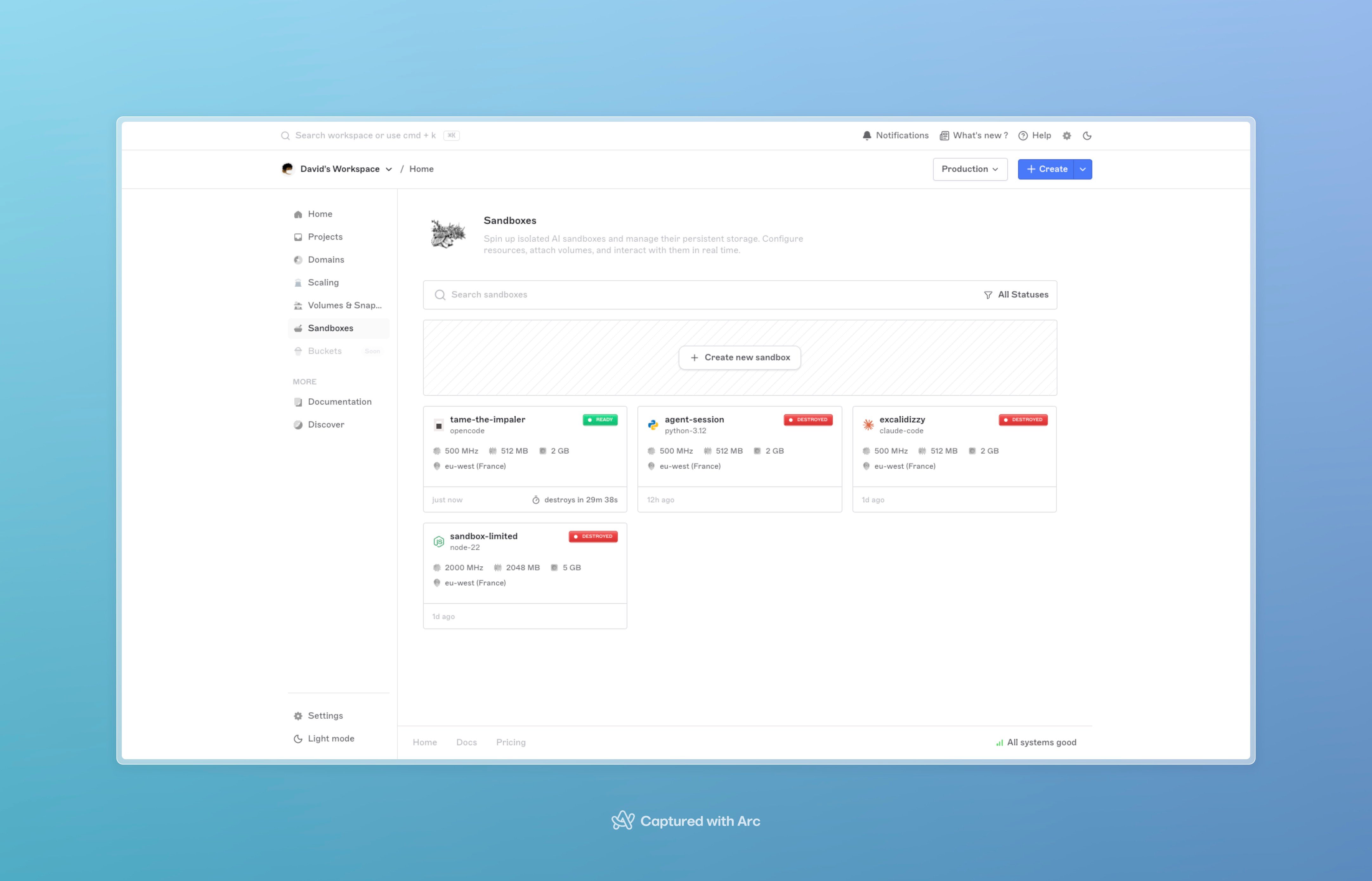 ## Templates
A sandbox starts from a **template**, a preconfigured base image with a runtime (and, in some cases, an AI coding agent) already installed. You pick the template at creation by passing its `name`. If you don't pass one, you get the platform default.
### Language runtimes
| Name | Description |
| ------------------------- | ----------------------------------------------------------------------------------------- |
| `python-3.12` *(default)* | Python 3.12 for general-purpose scripting, data processing, and backend dev. |
| `node-22` | Node.js 22 LTS for JavaScript / TypeScript server-side apps. |
| `bun-1` | Bun 1.x, fast all-in-one JS runtime, bundler, and package manager. |
| `deno-2` | Deno 2, secure runtime for JS / TS with built-in tooling. |
| `ubuntu-24` | Ubuntu 24.04 LTS, a clean base image for custom environments and general Linux workloads. |
### AI coding agents
These come with the agent already installed and configured to run autonomously inside the sandbox, useful for delegating coding tasks to an agent loop.
| Name | Description |
| ------------- | --------------------------------------------------------- |
| `claude-code` | Anthropic's Claude Code CLI. |
| `codex` | OpenAI Codex CLI. |
| `opencode` | OpenCode, the open-source terminal-based AI coding agent. |
| `droid` | Factory's Droid coding agent, autonomous-mode preset. |
### Get the live list
The template catalog is updated by the Brimble team without warning, new templates appear, and stale ones are deprecated. Pull the authoritative current list from the SDK:
```typescript theme={null}
const templates = await client.sandboxes.listTemplates();
```
See [SDKs → Discovery](sdks#discovery) for the Python and Go equivalents. The **New sandbox** dialog in the dashboard is populated from the same source.
## Lifecycle
A sandbox moves through a small state machine:
```text theme={null}
starting → ready ⇄ paused
│ │
│ ↓
└────→ destroyed (or failed)
```
* **`starting`**, provisioning is in flight. Operations that need a live sandbox (`exec`, file ops, `pause`) are rejected.
* **`ready`**, the container is up; you can exec, write files, snapshot, or pause.
* **`paused`**, the container is scaled to zero. CPU and memory billing stops. Persistent volumes (if any) stay attached.
* **`resuming`** / **`pausing`**, transient transitions; brief.
* **`destroyed`**, terminal. The sandbox is gone; persistent volumes (if any) are detached, not deleted.
* **`failed`**, provisioning hit an error and the sandbox can't be used. Destroy it and create a new one.
Provisioning is **synchronous on create**: `POST /sandboxes` blocks until the sandbox is `ready` (\~2–3s typical) and returns `status: "ready"`. You can call `exec` and other runtime operations immediately. Pause, resume, and destroy still transition asynchronously — poll the detail endpoint or watch the dashboard for those.
## Operations you can run
Once a sandbox is `ready`, the SDK exposes one method per operation. All three SDKs ([TypeScript, Python, Go](sdks)) share the same surface.
| Operation | SDK call | What it does |
| ------------------ | --------------------------------------- | ------------------------------------------------------------------------------------------------- |
| Exec command | `handle.exec({ cmd })` | Runs a shell command; returns stdout, stderr, exit code, duration. |
| Run code | `handle.runCode({ language, code })` | Runs a Python or Node snippet you pass in. Same return shape as exec. |
| Stream exec / code | `handle.exec({ cmd, stream: true })` | Streams stdout / stderr frames as they arrive. See [Stream exec output](sdks#stream-exec-output). |
| Write file | `handle.putFile(path, body)` | Streams the body to the file at `path` inside the sandbox. |
| Read file | `handle.getFile(path)` | Streams the file at `path` back to you. |
| Batch upload | `handle.putFiles([...])` | Uploads up to 100 files in one round trip. |
| Pause | `handle.pause()` | Scales the container to zero. Persistent volumes stay attached. |
| Resume | `handle.resume()` | Starts a fresh container and reattaches the volume. |
| Update egress | `handle.updateEgress({ mode, allow? })` | Changes outbound network policy at runtime. See [Network egress](#network-egress). |
| Snapshot | `handle.snapshots.create({ name })` | Captures the sandbox's filesystem as a restorable image. See [Snapshots](snapshots). |
| Destroy | `handle.destroy()` | Terminal cleanup. |
Start with the [SDKs](sdks). If you have to call the API directly (a runtime without an SDK, debugging, scripting from a shell), the [Sandbox API](/sandboxes) tab has the raw REST contract for every endpoint.
## Resource sizing
You pick CPU, memory, and ephemeral scratch disk per sandbox:
* **CPU**, Nomad MHz units; ranges from light (1 share) up to a few thousand MHz.
* **Memory**, megabytes; ranges from 1 MB up to 2 GB.
* **Disk**, ephemeral scratch space in GB; 1 to 5 GB.
If you need durable storage that survives pause and destroy, see the next section.
## Persistence
By default a sandbox is fully **ephemeral**: when it's destroyed, everything written to disk is gone. Two opt-in patterns add durability:
* **`persistent: true` + `persistentDiskGB`**, provisions a fresh persistent volume (10 to 50 GB) mounted at the sandbox's workspace directory. The volume survives pause and is detached (not deleted) on destroy.
* **`volumeId`**, attaches an existing detached volume you've used before. Useful for resuming work on the same files from a fresh sandbox.
Sandbox volumes are backed by **Brimble's globally distributed S3-compatible object storage**, the same backing layer used for [persistent disks](../projects/persistent-disk) on web-service projects. Your data isn't pinned to the local SSD of a specific host; if the sandbox lands on a different host on resume, the volume reattaches with the same files.
Pause and resume work on any sandbox, but only persistent volumes survive a pause. On an ephemeral sandbox, anything you wrote to disk is gone when you resume; on a persistent sandbox, the workspace directory is reattached on resume and your files come back. RAM state, running processes, and open sockets never survive a pause regardless.
## Auto-destroy
You can ask Brimble to destroy a sandbox automatically when it stops being useful:
* **`autoDestroy: true` + `destroyTimeout`**, destroy after a fixed wall-clock window. Allowed values: `30m`, `1h`, `3h`, `6h`, `12h`, `18h`.
* **`oneShot: true`**, destroy when the sandbox's main process exits. Good for one-off scripts.
* Every sandbox also has a hard **max-lifetime ceiling** set at the platform level; sandboxes that hit it are destroyed regardless of `autoDestroy`.
Each sandbox's `expires_at` field shows when it'll auto-destroy if nothing intervenes.
**Destroyed sandboxes are gone.** No grace period, no undelete. If the work needs to survive, take a [snapshot](snapshots) or use a [persistent volume](#persistence) before you destroy. Plan for the destroy or take action ahead of it.
## Network egress
Sandboxes get a normal outbound network by default: they can `curl`, install dependencies, and hit third-party APIs. For workloads you don't fully trust (AI-generated code, public dev environments), Brimble lets you control outbound traffic with three **egress modes**:
| Mode | Behavior |
| ------------ | --------------------------------------------------------------------------------------------------------- |
| `open` | Full outbound internet access (default). |
| `deny_all` | All outbound connections blocked. Inbound calls from the Brimble API (exec, files, snapshots) still work. |
| `restricted` | Default deny, with an allowlist of IPv4 addresses, CIDR ranges, or hostnames. |
Set egress at **create time** with the `egress` object, or change it later with **`PUT /sandboxes/{id}/egress`** (SDK: `handle.updateEgress(...)`). Switching between `open`, `deny_all`, and `restricted` may reattach the sandbox to a different network profile; the update response includes `network_updated: true` when that happens. Allow a few seconds for the new policy to take effect before probing from inside the sandbox.
```typescript TypeScript theme={null}
import { Sandbox, SandboxEgressMode } from "@brimble/sandbox";
const client = new Sandbox();
// Create with restricted egress
const sandbox = await client.sandboxes.create({
template: "node-22",
egress: {
mode: SandboxEgressMode.Restricted,
allow: ["1.1.1.1", "api.example.com"],
},
});
// Tighten to deny-all at runtime
await sandbox.updateEgress({ mode: SandboxEgressMode.DenyAll });
```
```python Python theme={null}
from brimble_sandbox import Sandbox
from brimble_sandbox.enums import SandboxEgressMode
client = Sandbox()
sandbox = client.sandboxes.create({
"template": "node-22",
"egress": {
"mode": SandboxEgressMode.RESTRICTED,
"allow": ["1.1.1.1", "api.example.com"],
},
})
sandbox.update_egress({"mode": SandboxEgressMode.DENY_ALL})
```
```go Go theme={null}
import sandbox "github.com/brimblehq/brimble-sdks/sandbox-go"
client, _ := sandbox.NewClient(sandbox.ClientConfig{})
handle, _ := client.Sandboxes.Create(ctx, sandbox.CreateSandboxRequest{
Template: "node-22",
Egress: &sandbox.SandboxEgressConfig{
Mode: sandbox.SandboxEgressModeRestricted,
Allow: []string{"1.1.1.1", "api.example.com"},
},
})
handle.UpdateEgress(ctx, sandbox.UpdateSandboxEgressInput{
Mode: sandbox.SandboxEgressModeDenyAll,
})
```
**Legacy shorthand:** `blockOutbound: true` at create time maps to `deny_all`. Prefer the `egress` object for new code; you cannot combine `egress` and `blockOutbound` on the same request.
See [SDKs → Network egress](sdks#network-egress) for the full SDK surface and [Update sandbox egress](/api-reference/sandboxes/egress-update) for the REST contract.
## Streaming exec output
By default, `exec` and `runCode` buffer output and return the full result when the command finishes. For long-running commands (installs, agent loops, build steps), pass **`stream: true`** to receive stdout and stderr as Server-Sent Events (`text/event-stream`) while the command runs.
Each SDK wraps the SSE stream in an **`ExecStream`** object you can iterate live, then call `.result()` for the final aggregated `stdout`, `stderr`, `exit_code`, and `duration_ms`. Alternatively, pass **`onStdout` / `onStderr` callbacks** on a normal `exec` call and the SDK streams under the hood but still returns a buffered `ExecResult`.
```typescript TypeScript theme={null}
const output = await sandbox.exec({
cmd: "for i in 1 2 3; do echo $i; done",
stream: true,
});
for await (const log of output) {
if (log.stream === "stdout") process.stdout.write(log.data);
}
const result = await output.result();
console.log(result.exit_code);
```
```python Python theme={null}
output = sandbox.exec_stream({"cmd": "for i in 1 2 3; do echo $i; done"})
for log in output:
if log["stream"] == "stdout":
print(log["data"], end="")
result = output.result()
print(result["exit_code"])
```
```go Go theme={null}
output, _ := handle.ExecStream(ctx, sandbox.ExecInput{
Cmd: "for i in 1 2 3; do echo $i; done",
})
defer output.Close()
_ = output.IterateLogs(ctx, func(log sandbox.ExecLog) error {
if log.Stream == sandbox.LogStreamStdout {
fmt.Print(log.Data)
}
return nil
})
result, _ := output.Result(ctx)
fmt.Println(result.ExitCode)
```
See [SDKs → Stream exec output](sdks#stream-exec-output) for callbacks, `runCode` streaming, and raw SSE frame access.
## Billing and plan caveats
* Each running sandbox bills sandbox CPU/memory usage for the time it's `ready` or `resuming` (with plan-included allowances applied). **Paused** sandboxes stop sandbox CPU/memory billing; snapshot storage and persistent volumes bill separately at storage rates.
* Free plan accounts have a small sandbox quota and can only create sandboxes in regions marked free; paid regions are rejected at create time with a clear error.
* Each plan has a maximum concurrent sandbox count. Once you hit it, new create requests are rejected until you destroy one.
* A workspace-level spending limit (set under **Billing → Limits**) can pause sandbox creation entirely. The limit applies platform-wide, so if you hit it, every new sandbox is rejected with a *"spending limit reached"* error until you raise the limit or the cycle rolls over.
**Spending limits hard-stop new sandboxes.** When the limit fires, existing sandboxes keep running, but you can't create more until you raise the cap or the billing cycle rolls. If you depend on creating sandboxes on demand (a coding playground app, a CI tool), monitor your limit ahead of usage spikes.
## Next steps
* [SDKs](sdks), full reference for the TypeScript, Python, and Go SDKs.
* [Quickstart](quickstart), create your first sandbox in five minutes.
* [Snapshots](snapshots), save and restore sandbox state.
* [Cookbook](cookbook/untrusted-code) — untrusted code, AI agents, [Docker inside a sandbox](cookbook/docker-in-sandbox), persistent dev environments.
* [Inside the Brimble Sandbox runtime](sandbox-system), how Brimble provisions and manages sandboxes underneath.
## Templates
A sandbox starts from a **template**, a preconfigured base image with a runtime (and, in some cases, an AI coding agent) already installed. You pick the template at creation by passing its `name`. If you don't pass one, you get the platform default.
### Language runtimes
| Name | Description |
| ------------------------- | ----------------------------------------------------------------------------------------- |
| `python-3.12` *(default)* | Python 3.12 for general-purpose scripting, data processing, and backend dev. |
| `node-22` | Node.js 22 LTS for JavaScript / TypeScript server-side apps. |
| `bun-1` | Bun 1.x, fast all-in-one JS runtime, bundler, and package manager. |
| `deno-2` | Deno 2, secure runtime for JS / TS with built-in tooling. |
| `ubuntu-24` | Ubuntu 24.04 LTS, a clean base image for custom environments and general Linux workloads. |
### AI coding agents
These come with the agent already installed and configured to run autonomously inside the sandbox, useful for delegating coding tasks to an agent loop.
| Name | Description |
| ------------- | --------------------------------------------------------- |
| `claude-code` | Anthropic's Claude Code CLI. |
| `codex` | OpenAI Codex CLI. |
| `opencode` | OpenCode, the open-source terminal-based AI coding agent. |
| `droid` | Factory's Droid coding agent, autonomous-mode preset. |
### Get the live list
The template catalog is updated by the Brimble team without warning, new templates appear, and stale ones are deprecated. Pull the authoritative current list from the SDK:
```typescript theme={null}
const templates = await client.sandboxes.listTemplates();
```
See [SDKs → Discovery](sdks#discovery) for the Python and Go equivalents. The **New sandbox** dialog in the dashboard is populated from the same source.
## Lifecycle
A sandbox moves through a small state machine:
```text theme={null}
starting → ready ⇄ paused
│ │
│ ↓
└────→ destroyed (or failed)
```
* **`starting`**, provisioning is in flight. Operations that need a live sandbox (`exec`, file ops, `pause`) are rejected.
* **`ready`**, the container is up; you can exec, write files, snapshot, or pause.
* **`paused`**, the container is scaled to zero. CPU and memory billing stops. Persistent volumes (if any) stay attached.
* **`resuming`** / **`pausing`**, transient transitions; brief.
* **`destroyed`**, terminal. The sandbox is gone; persistent volumes (if any) are detached, not deleted.
* **`failed`**, provisioning hit an error and the sandbox can't be used. Destroy it and create a new one.
Provisioning is **synchronous on create**: `POST /sandboxes` blocks until the sandbox is `ready` (\~2–3s typical) and returns `status: "ready"`. You can call `exec` and other runtime operations immediately. Pause, resume, and destroy still transition asynchronously — poll the detail endpoint or watch the dashboard for those.
## Operations you can run
Once a sandbox is `ready`, the SDK exposes one method per operation. All three SDKs ([TypeScript, Python, Go](sdks)) share the same surface.
| Operation | SDK call | What it does |
| ------------------ | --------------------------------------- | ------------------------------------------------------------------------------------------------- |
| Exec command | `handle.exec({ cmd })` | Runs a shell command; returns stdout, stderr, exit code, duration. |
| Run code | `handle.runCode({ language, code })` | Runs a Python or Node snippet you pass in. Same return shape as exec. |
| Stream exec / code | `handle.exec({ cmd, stream: true })` | Streams stdout / stderr frames as they arrive. See [Stream exec output](sdks#stream-exec-output). |
| Write file | `handle.putFile(path, body)` | Streams the body to the file at `path` inside the sandbox. |
| Read file | `handle.getFile(path)` | Streams the file at `path` back to you. |
| Batch upload | `handle.putFiles([...])` | Uploads up to 100 files in one round trip. |
| Pause | `handle.pause()` | Scales the container to zero. Persistent volumes stay attached. |
| Resume | `handle.resume()` | Starts a fresh container and reattaches the volume. |
| Update egress | `handle.updateEgress({ mode, allow? })` | Changes outbound network policy at runtime. See [Network egress](#network-egress). |
| Snapshot | `handle.snapshots.create({ name })` | Captures the sandbox's filesystem as a restorable image. See [Snapshots](snapshots). |
| Destroy | `handle.destroy()` | Terminal cleanup. |
Start with the [SDKs](sdks). If you have to call the API directly (a runtime without an SDK, debugging, scripting from a shell), the [Sandbox API](/sandboxes) tab has the raw REST contract for every endpoint.
## Resource sizing
You pick CPU, memory, and ephemeral scratch disk per sandbox:
* **CPU**, Nomad MHz units; ranges from light (1 share) up to a few thousand MHz.
* **Memory**, megabytes; ranges from 1 MB up to 2 GB.
* **Disk**, ephemeral scratch space in GB; 1 to 5 GB.
If you need durable storage that survives pause and destroy, see the next section.
## Persistence
By default a sandbox is fully **ephemeral**: when it's destroyed, everything written to disk is gone. Two opt-in patterns add durability:
* **`persistent: true` + `persistentDiskGB`**, provisions a fresh persistent volume (10 to 50 GB) mounted at the sandbox's workspace directory. The volume survives pause and is detached (not deleted) on destroy.
* **`volumeId`**, attaches an existing detached volume you've used before. Useful for resuming work on the same files from a fresh sandbox.
Sandbox volumes are backed by **Brimble's globally distributed S3-compatible object storage**, the same backing layer used for [persistent disks](../projects/persistent-disk) on web-service projects. Your data isn't pinned to the local SSD of a specific host; if the sandbox lands on a different host on resume, the volume reattaches with the same files.
Pause and resume work on any sandbox, but only persistent volumes survive a pause. On an ephemeral sandbox, anything you wrote to disk is gone when you resume; on a persistent sandbox, the workspace directory is reattached on resume and your files come back. RAM state, running processes, and open sockets never survive a pause regardless.
## Auto-destroy
You can ask Brimble to destroy a sandbox automatically when it stops being useful:
* **`autoDestroy: true` + `destroyTimeout`**, destroy after a fixed wall-clock window. Allowed values: `30m`, `1h`, `3h`, `6h`, `12h`, `18h`.
* **`oneShot: true`**, destroy when the sandbox's main process exits. Good for one-off scripts.
* Every sandbox also has a hard **max-lifetime ceiling** set at the platform level; sandboxes that hit it are destroyed regardless of `autoDestroy`.
Each sandbox's `expires_at` field shows when it'll auto-destroy if nothing intervenes.
**Destroyed sandboxes are gone.** No grace period, no undelete. If the work needs to survive, take a [snapshot](snapshots) or use a [persistent volume](#persistence) before you destroy. Plan for the destroy or take action ahead of it.
## Network egress
Sandboxes get a normal outbound network by default: they can `curl`, install dependencies, and hit third-party APIs. For workloads you don't fully trust (AI-generated code, public dev environments), Brimble lets you control outbound traffic with three **egress modes**:
| Mode | Behavior |
| ------------ | --------------------------------------------------------------------------------------------------------- |
| `open` | Full outbound internet access (default). |
| `deny_all` | All outbound connections blocked. Inbound calls from the Brimble API (exec, files, snapshots) still work. |
| `restricted` | Default deny, with an allowlist of IPv4 addresses, CIDR ranges, or hostnames. |
Set egress at **create time** with the `egress` object, or change it later with **`PUT /sandboxes/{id}/egress`** (SDK: `handle.updateEgress(...)`). Switching between `open`, `deny_all`, and `restricted` may reattach the sandbox to a different network profile; the update response includes `network_updated: true` when that happens. Allow a few seconds for the new policy to take effect before probing from inside the sandbox.
```typescript TypeScript theme={null}
import { Sandbox, SandboxEgressMode } from "@brimble/sandbox";
const client = new Sandbox();
// Create with restricted egress
const sandbox = await client.sandboxes.create({
template: "node-22",
egress: {
mode: SandboxEgressMode.Restricted,
allow: ["1.1.1.1", "api.example.com"],
},
});
// Tighten to deny-all at runtime
await sandbox.updateEgress({ mode: SandboxEgressMode.DenyAll });
```
```python Python theme={null}
from brimble_sandbox import Sandbox
from brimble_sandbox.enums import SandboxEgressMode
client = Sandbox()
sandbox = client.sandboxes.create({
"template": "node-22",
"egress": {
"mode": SandboxEgressMode.RESTRICTED,
"allow": ["1.1.1.1", "api.example.com"],
},
})
sandbox.update_egress({"mode": SandboxEgressMode.DENY_ALL})
```
```go Go theme={null}
import sandbox "github.com/brimblehq/brimble-sdks/sandbox-go"
client, _ := sandbox.NewClient(sandbox.ClientConfig{})
handle, _ := client.Sandboxes.Create(ctx, sandbox.CreateSandboxRequest{
Template: "node-22",
Egress: &sandbox.SandboxEgressConfig{
Mode: sandbox.SandboxEgressModeRestricted,
Allow: []string{"1.1.1.1", "api.example.com"},
},
})
handle.UpdateEgress(ctx, sandbox.UpdateSandboxEgressInput{
Mode: sandbox.SandboxEgressModeDenyAll,
})
```
**Legacy shorthand:** `blockOutbound: true` at create time maps to `deny_all`. Prefer the `egress` object for new code; you cannot combine `egress` and `blockOutbound` on the same request.
See [SDKs → Network egress](sdks#network-egress) for the full SDK surface and [Update sandbox egress](/api-reference/sandboxes/egress-update) for the REST contract.
## Streaming exec output
By default, `exec` and `runCode` buffer output and return the full result when the command finishes. For long-running commands (installs, agent loops, build steps), pass **`stream: true`** to receive stdout and stderr as Server-Sent Events (`text/event-stream`) while the command runs.
Each SDK wraps the SSE stream in an **`ExecStream`** object you can iterate live, then call `.result()` for the final aggregated `stdout`, `stderr`, `exit_code`, and `duration_ms`. Alternatively, pass **`onStdout` / `onStderr` callbacks** on a normal `exec` call and the SDK streams under the hood but still returns a buffered `ExecResult`.
```typescript TypeScript theme={null}
const output = await sandbox.exec({
cmd: "for i in 1 2 3; do echo $i; done",
stream: true,
});
for await (const log of output) {
if (log.stream === "stdout") process.stdout.write(log.data);
}
const result = await output.result();
console.log(result.exit_code);
```
```python Python theme={null}
output = sandbox.exec_stream({"cmd": "for i in 1 2 3; do echo $i; done"})
for log in output:
if log["stream"] == "stdout":
print(log["data"], end="")
result = output.result()
print(result["exit_code"])
```
```go Go theme={null}
output, _ := handle.ExecStream(ctx, sandbox.ExecInput{
Cmd: "for i in 1 2 3; do echo $i; done",
})
defer output.Close()
_ = output.IterateLogs(ctx, func(log sandbox.ExecLog) error {
if log.Stream == sandbox.LogStreamStdout {
fmt.Print(log.Data)
}
return nil
})
result, _ := output.Result(ctx)
fmt.Println(result.ExitCode)
```
See [SDKs → Stream exec output](sdks#stream-exec-output) for callbacks, `runCode` streaming, and raw SSE frame access.
## Billing and plan caveats
* Each running sandbox bills sandbox CPU/memory usage for the time it's `ready` or `resuming` (with plan-included allowances applied). **Paused** sandboxes stop sandbox CPU/memory billing; snapshot storage and persistent volumes bill separately at storage rates.
* Free plan accounts have a small sandbox quota and can only create sandboxes in regions marked free; paid regions are rejected at create time with a clear error.
* Each plan has a maximum concurrent sandbox count. Once you hit it, new create requests are rejected until you destroy one.
* A workspace-level spending limit (set under **Billing → Limits**) can pause sandbox creation entirely. The limit applies platform-wide, so if you hit it, every new sandbox is rejected with a *"spending limit reached"* error until you raise the limit or the cycle rolls over.
**Spending limits hard-stop new sandboxes.** When the limit fires, existing sandboxes keep running, but you can't create more until you raise the cap or the billing cycle rolls. If you depend on creating sandboxes on demand (a coding playground app, a CI tool), monitor your limit ahead of usage spikes.
## Next steps
* [SDKs](sdks), full reference for the TypeScript, Python, and Go SDKs.
* [Quickstart](quickstart), create your first sandbox in five minutes.
* [Snapshots](snapshots), save and restore sandbox state.
* [Cookbook](cookbook/untrusted-code) — untrusted code, AI agents, [Docker inside a sandbox](cookbook/docker-in-sandbox), persistent dev environments.
* [Inside the Brimble Sandbox runtime](sandbox-system), how Brimble provisions and manages sandboxes underneath.