> ## Documentation Index
> Fetch the complete documentation index at: https://paper.brimble.io/llms.txt
> Use this file to discover all available pages before exploring further.
# Sandbox quickstart
> Create a sandbox with the SDK, run code in it, write a file, take a snapshot, and destroy it, in under five minutes.
Create a sandbox, run a command, write a file, take a snapshot, and tear it down. The whole loop, end-to-end, in about five minutes.
Everything below uses the **SDK**, which handles retries, idempotency, and serialization for you. The dashboard path is at the bottom if you'd rather click through; raw HTTP is documented in the [Sandbox API](/sandboxes) tab if you need it.
## Prerequisites
* A Brimble account. Free plan works for non-paid regions; paid regions need a Hacker plan or higher.
* An **API key** from the profile drawer (avatar → **API key**). Paid plans only.
* The SDK for your language installed and `BRIMBLE_SANDBOX_KEY` set in your environment.
```bash TypeScript theme={null}
npm install @brimble/sandbox
export BRIMBLE_SANDBOX_KEY="sk_..."
```
```bash Python theme={null}
pip install brimble-sandbox
export BRIMBLE_SANDBOX_KEY="sk_..."
```
```bash Go theme={null}
go get github.com/brimblehq/brimble-sdks/sandbox-go
export BRIMBLE_SANDBOX_KEY="sk_..."
```
## Step 1: Create a sandbox
`create` provisions a sandbox and blocks until it is `ready` (\~2–3s). The handle you get back can run `exec` immediately. Set a client timeout of at least **90 seconds** for the create call.
```typescript TypeScript theme={null}
import { Sandbox } from "@brimble/sandbox";
const client = new Sandbox();
const sandbox = await client.sandboxes.create({
region: "auto",
template: "node-22",
name: "my-first-sandbox",
});
console.log(sandbox.id, sandbox.status); // ..., "ready"
```
```python Python theme={null}
from brimble_sandbox import Sandbox
client = Sandbox()
sandbox = client.sandboxes.create({
"region": "auto",
"template": "python-3.12",
"name": "my-first-sandbox",
})
print(sandbox.id, sandbox.status) # ..., "ready"
```
```go Go theme={null}
package main
import (
"context"
"fmt"
sandbox "github.com/brimblehq/brimble-sdks/sandbox-go"
)
func main() {
ctx := context.Background()
client, _ := sandbox.NewClient(sandbox.ClientConfig{})
handle, err := client.Sandboxes.Create(ctx, sandbox.CreateSandboxRequest{
Region: "auto",
Template: "node-22",
Name: "my-first-sandbox",
})
if err != nil {
panic(err)
}
fmt.Println(handle.ID(), handle.Status())
}
```
`region` is optional. `"auto"` lets the server pick the best region for your account; omit the field entirely for the same behaviour. Pass a specific region ID from `listRegions()` to pin one.
## Step 2: Run a command
```typescript TypeScript theme={null}
const result = await sandbox.exec({
cmd: "echo hello from brimble && uname -a",
});
console.log(result.stdout);
console.log("exit:", result.exit_code);
```
```python Python theme={null}
result = sandbox.exec({"cmd": "echo hello from brimble && uname -a"})
print(result["stdout"])
print("exit:", result["exit_code"])
```
```go Go theme={null}
run, _ := handle.Exec(ctx, sandbox.ExecInput{
Cmd: "echo hello from brimble && uname -a",
})
fmt.Println(run.Stdout)
fmt.Println("exit:", run.ExitCode)
```
You get back stdout, stderr, exit code, and duration. After `create()`, the sandbox is already `ready`. Use `waitUntilReady: true` on runtime calls only when reconnecting to a sandbox that may still be resuming (e.g. after `get()` on a sandbox you know was paused).
### Stream output live (optional)
For commands that take a while, stream stdout/stderr as it arrives instead of waiting for the full buffer:
```typescript TypeScript theme={null}
const output = await sandbox.exec({
cmd: "for i in 1 2 3; do echo line-$i; sleep 0.2; done",
stream: true,
});
for await (const log of output) {
process.stdout.write(`[${log.stream}] ${log.data}`);
}
const streamed = await output.result();
console.log("done, exit:", streamed.exit_code);
```
```python Python theme={null}
output = sandbox.exec_stream({
"cmd": "for i in 1 2 3; do echo line-$i; sleep 0.2; done",
})
for log in output:
print(f"[{log['stream']}] {log['data']}", end="")
streamed = output.result()
print("done, exit:", streamed["exit_code"])
```
```go Go theme={null}
output, _ := handle.ExecStream(ctx, sandbox.ExecInput{
Cmd: "for i in 1 2 3; do echo line-$i; sleep 0.2; done",
})
defer output.Close()
_ = output.IterateLogs(ctx, func(log sandbox.ExecLog) error {
fmt.Printf("[%s] %s", log.Stream, log.Data)
return nil
})
streamed, _ := output.Result(ctx)
fmt.Println("done, exit:", streamed.ExitCode)
```
See [SDKs → Stream exec output](sdks#stream-exec-output) for callback-based streaming and `runCode` streaming.
## Step 3: Run code in a language runtime
`runCode` is the language-aware sibling of `exec`. Hand it a snippet and an interpreter.
```typescript TypeScript theme={null}
const result = await sandbox.runCode({
language: "python",
code: "import sys, json\nprint(json.dumps({'version': sys.version}))",
});
console.log(result.stdout);
```
```python Python theme={null}
result = sandbox.run_code({
"language": "python",
"code": "import sys, json\nprint(json.dumps({'version': sys.version}))",
})
print(result["stdout"])
```
```go Go theme={null}
run, _ := handle.RunCode(ctx, sandbox.RunCodeInput{
Language: "python",
Code: "import sys, json\nprint(json.dumps({'version': sys.version}))",
})
fmt.Println(run.Stdout)
```
## Step 4: Write and read a file
```typescript TypeScript theme={null}
await sandbox.putFile("/app/index.js", "console.log('hello')");
const buf = await sandbox.getFile("/app/index.js");
console.log(new TextDecoder().decode(buf));
```
```python Python theme={null}
sandbox.put_file("/app/index.js", b"console.log('hello')")
contents = sandbox.get_file("/app/index.js")
print(contents.decode())
```
```go Go theme={null}
import "strings"
body := "console.log('hello')"
_ = handle.PutFile(ctx, "/app/index.js", strings.NewReader(body), int64(len(body)))
rc, _ := handle.GetFile(ctx, "/app/index.js")
defer rc.Close()
```
Uploads and downloads stream; both honor the per-file size cap for your plan.
## Step 5: Take a snapshot
A snapshot captures the sandbox's filesystem as a restorable image. Launch a fresh sandbox from a snapshot later and get exactly that state back.
```typescript TypeScript theme={null}
const snap = await sandbox.snapshots.create({ name: "first-snapshot" });
console.log(snap.id, snap.status); // status starts as "creating"
```
```python Python theme={null}
snap = sandbox.snapshots.create({"name": "first-snapshot"})
print(snap["id"], snap["status"])
```
```go Go theme={null}
snap, _ := handle.Snapshots.Create(ctx, sandbox.CreateSnapshotInput{Name: "first-snapshot"})
fmt.Println(snap.ID, snap.Status)
```
Snapshots are asynchronous: `status` starts as `creating` and flips to `ready` when the image is built. See [Snapshots](snapshots) for the full lifecycle, including automatic snapshots.
## Step 6: Destroy
```typescript TypeScript theme={null}
await sandbox.destroy();
```
```python Python theme={null}
sandbox.destroy()
```
```go Go theme={null}
_ = handle.Destroy(ctx)
```
Persistent volumes (if you created the sandbox with `persistent: true`) are **detached**, not deleted; you can attach them to a future sandbox by passing their `volumeId`.
**Destroy is final for ephemeral sandboxes.** Anything written to a non-persistent sandbox is gone the moment you destroy. Snapshot or save to a persistent volume first if the work matters.
## What to try next
* Set `oneShot: true` on creation to auto-destroy the moment your main process exits, perfect for batch jobs.
* Set `egress: { mode: "deny_all" }` (or legacy `blockOutbound: true`) if you're running untrusted code and want no outbound network access. Use `restricted` with an allowlist when the workload needs a few specific endpoints (model APIs, package registries).
* Set `autoDestroy: true` with a `destroyTimeout` (`30m`, `1h`, `3h`, `6h`, `12h`, `18h`) so abandoned sandboxes clean themselves up.
* Restore a sandbox from a snapshot by passing `fromSnapshot: ""` on create.
* Stream exec output live with `stream: true` (TypeScript), `exec_stream()` (Python), or `ExecStream()` (Go). See [SDKs → Stream exec output](sdks#stream-exec-output).
* Use `client.sandboxes.quickstartNode()` or `quickstartPython()` for one-line "give me a persistent dev box" presets. See [SDKs](sdks#quickstart-presets).
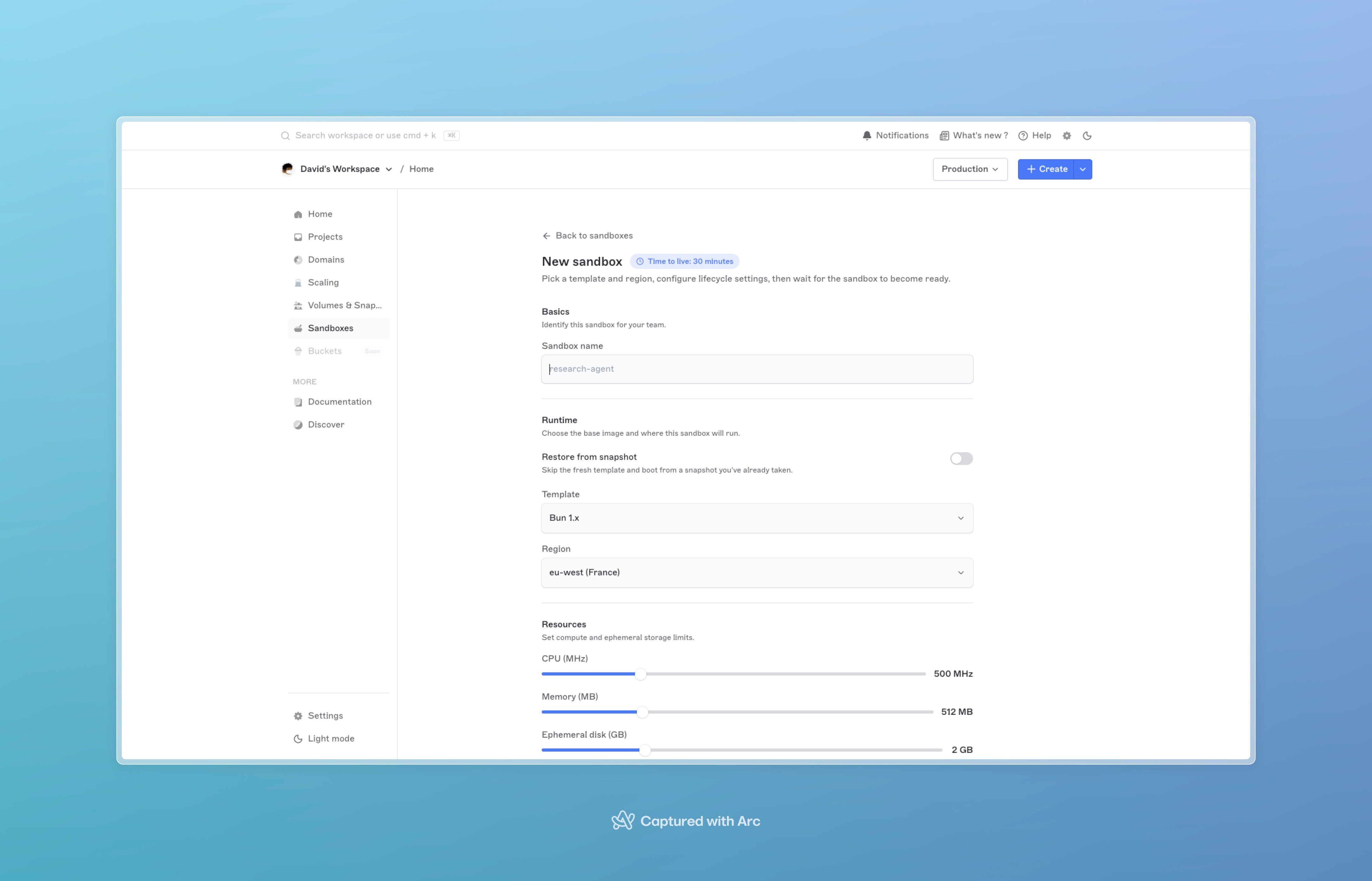
## From the dashboard
If you'd rather click through it first:
1. Open the dashboard.
2. Click **Sandboxes** in the sidebar, then **New sandbox**.
3. Pick a **template** (e.g. `node-22`, `python-3.12`).
4. Pick a **region**. Free-plan accounts only see free-tier regions.
5. Optionally set CPU, memory, and ephemeral disk under **Specs**.
6. Click **Create**. The form blocks for a few seconds while the sandbox provisions, then opens the detail page with status **ready**. From there, **Terminal**, **Files**, and **Snapshots** tabs cover the rest of this flow.
 ## Next steps
* [SDKs](sdks), full reference for the TypeScript, Python, and Go SDKs, all the helpers, streaming, batch uploads, retries.
* [Sandboxes overview](overview), lifecycle, sizing, billing.
* [Snapshots](snapshots), manual + automatic snapshot flows.
* [Cookbook](cookbook/untrusted-code), end-to-end recipes for common sandbox use cases.
## Next steps
* [SDKs](sdks), full reference for the TypeScript, Python, and Go SDKs, all the helpers, streaming, batch uploads, retries.
* [Sandboxes overview](overview), lifecycle, sizing, billing.
* [Snapshots](snapshots), manual + automatic snapshot flows.
* [Cookbook](cookbook/untrusted-code), end-to-end recipes for common sandbox use cases.