> ## Documentation Index
> Fetch the complete documentation index at: https://paper.brimble.io/llms.txt
> Use this file to discover all available pages before exploring further.
# Snapshots
> Capture a sandbox's state as a restorable image. Restore into a fresh sandbox later.
A **snapshot** is a point-in-time image of a sandbox's filesystem. You can launch a brand-new sandbox from any snapshot you own, with exactly the files you saved. Use snapshots to:
* Save a working environment before risky changes.
* Hand off a configured environment to a teammate (within your account; snapshots are per-user).
* Spin up identical sandboxes from a known-good baseline instead of re-running setup every time.
Snapshots are independent objects: a sandbox can be destroyed without affecting its snapshots, and a snapshot can be deleted without affecting the sandbox it came from.
## Creating a snapshot
You create snapshots in two modes: manually whenever you want, or on a schedule.
### Manual
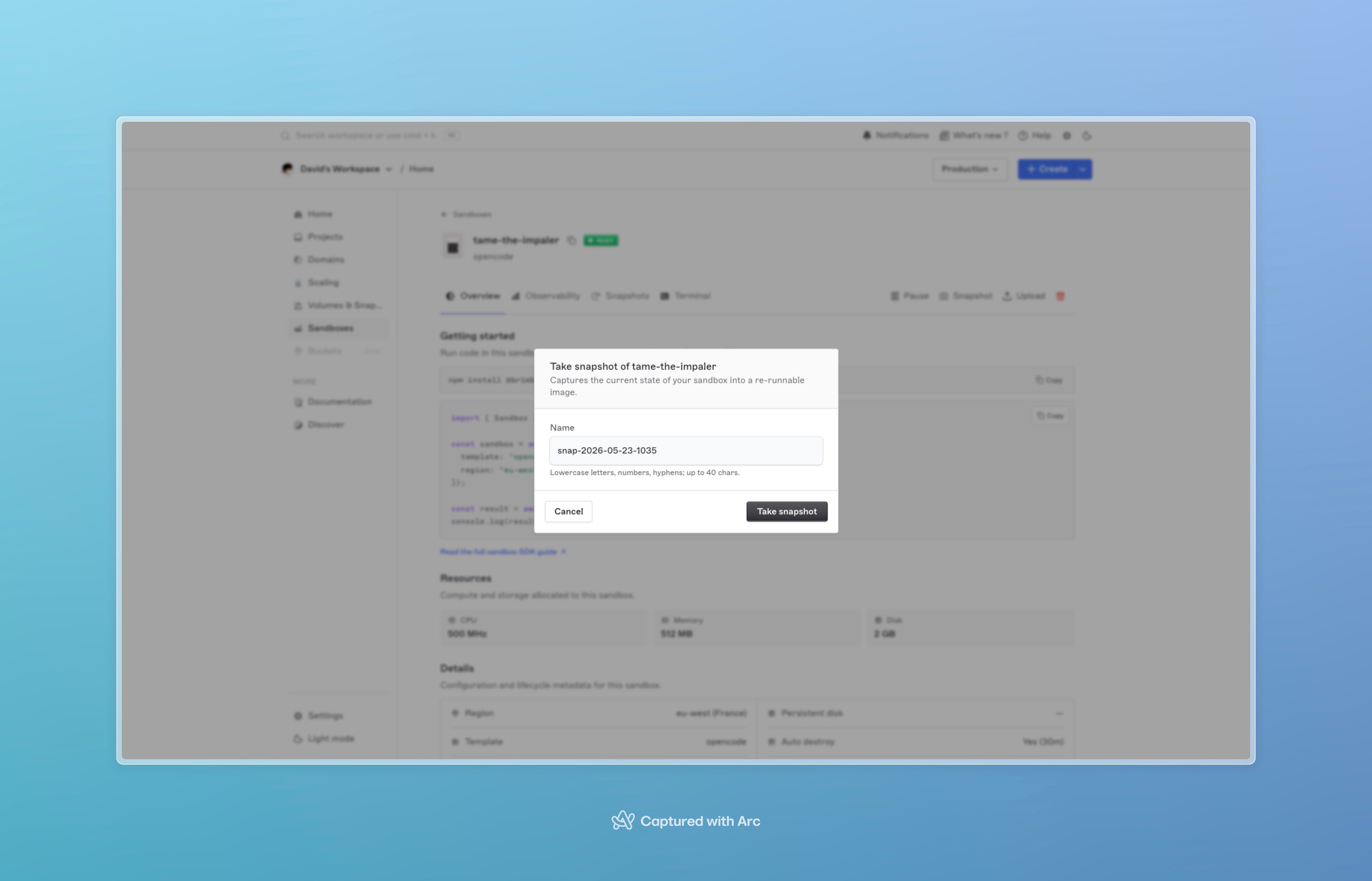
From the dashboard, click **Snapshot** on a sandbox's detail page and name it. From the SDK, call `snapshots.create` on the handle:
```typescript TypeScript theme={null}
const snap = await handle.snapshots.create({ name: "before-migration" });
console.log(snap.id, snap.status); // status starts as "creating"
```
```python Python theme={null}
snap = sandbox.snapshots.create({"name": "before-migration"})
print(snap["id"], snap["status"])
```
```go Go theme={null}
snap, _ := handle.Snapshots.Create(ctx, sandbox.CreateSnapshotInput{Name: "before-migration"})
fmt.Println(snap.ID, snap.Status)
```
The name is lowercase letters, digits, and hyphens, 1–40 chars.
The response is immediate with `status: "creating"`. The snapshot transitions to `ready` once the image is built, typically within a couple of minutes for typical sandbox sizes. If the build fails, the snapshot moves to `failed` and stays there; failed snapshots don't auto-retry.
 You can only snapshot a `ready` sandbox. Sandboxes that are `paused`, `starting`, or anything else reject the snapshot call. Only one snapshot per sandbox can be in-flight at a time; back-to-back requests serialize.
### Automatic
To snapshot on a schedule, set `snapshotMode: "automatic"` and `snapshotFrequency` (a five-field cron expression) at sandbox creation:
```typescript TypeScript theme={null}
const handle = await client.sandboxes.create({
template: "node-22",
persistent: true,
persistentDiskGB: 20,
snapshotMode: "automatic",
snapshotFrequency: "0 */2 * * *", // every two hours
});
```
```python Python theme={null}
sandbox = client.sandboxes.create({
"template": "node-22",
"persistent": True,
"persistentDiskGB": 20,
"snapshotMode": "automatic",
"snapshotFrequency": "0 */2 * * *",
})
```
```go Go theme={null}
handle, _ := client.Sandboxes.Create(ctx, sandbox.CreateSandboxRequest{
Template: "node-22",
Persistent: true,
PersistentDiskGB: 20,
SnapshotMode: "automatic",
SnapshotFrequency: "0 */2 * * *",
})
```
The example above snapshots every two hours. The scheduler only fires when the sandbox is `ready` and no snapshot is already in flight; if the sandbox is paused or busy, the tick is skipped (it doesn't queue up missed runs).
`snapshotMode` defaults to `manual`. `snapshotFrequency` is required when mode is `automatic` and forbidden otherwise.
## Restoring from a snapshot
Restoring doesn't modify the snapshot; it creates a **new** sandbox whose initial filesystem is the snapshot's image. Pass `fromSnapshot` to any create call:
```typescript TypeScript theme={null}
const handle = await client.sandboxes.create({
fromSnapshot: snapshotId,
});
```
```python Python theme={null}
sandbox = client.sandboxes.create({
"fromSnapshot": snapshot_id,
})
```
```go Go theme={null}
handle, _ := client.Sandboxes.Create(ctx, sandbox.CreateSandboxRequest{
FromSnapshot: snapshotID,
})
```
A few things to know:
* Only **`ready`** snapshots are restorable. `creating` rejects with a clear error; `failed` is unusable.
* The new sandbox's `template` is inherited from the snapshot's source template.
* The new sandbox gets a fresh ID and is otherwise independent; pause, exec, destroy, all behave normally.
* You can restore the same snapshot any number of times. Each restore is a separate sandbox.
**Restores boot a few seconds slower than a fresh template sandbox.** Snapshots aren't pre-warmed — the image has to be pulled and unpacked before the container can start. `create()` with `fromSnapshot` still blocks until `ready`; allow a slightly longer client timeout than a template-only create.
You can only snapshot a `ready` sandbox. Sandboxes that are `paused`, `starting`, or anything else reject the snapshot call. Only one snapshot per sandbox can be in-flight at a time; back-to-back requests serialize.
### Automatic
To snapshot on a schedule, set `snapshotMode: "automatic"` and `snapshotFrequency` (a five-field cron expression) at sandbox creation:
```typescript TypeScript theme={null}
const handle = await client.sandboxes.create({
template: "node-22",
persistent: true,
persistentDiskGB: 20,
snapshotMode: "automatic",
snapshotFrequency: "0 */2 * * *", // every two hours
});
```
```python Python theme={null}
sandbox = client.sandboxes.create({
"template": "node-22",
"persistent": True,
"persistentDiskGB": 20,
"snapshotMode": "automatic",
"snapshotFrequency": "0 */2 * * *",
})
```
```go Go theme={null}
handle, _ := client.Sandboxes.Create(ctx, sandbox.CreateSandboxRequest{
Template: "node-22",
Persistent: true,
PersistentDiskGB: 20,
SnapshotMode: "automatic",
SnapshotFrequency: "0 */2 * * *",
})
```
The example above snapshots every two hours. The scheduler only fires when the sandbox is `ready` and no snapshot is already in flight; if the sandbox is paused or busy, the tick is skipped (it doesn't queue up missed runs).
`snapshotMode` defaults to `manual`. `snapshotFrequency` is required when mode is `automatic` and forbidden otherwise.
## Restoring from a snapshot
Restoring doesn't modify the snapshot; it creates a **new** sandbox whose initial filesystem is the snapshot's image. Pass `fromSnapshot` to any create call:
```typescript TypeScript theme={null}
const handle = await client.sandboxes.create({
fromSnapshot: snapshotId,
});
```
```python Python theme={null}
sandbox = client.sandboxes.create({
"fromSnapshot": snapshot_id,
})
```
```go Go theme={null}
handle, _ := client.Sandboxes.Create(ctx, sandbox.CreateSandboxRequest{
FromSnapshot: snapshotID,
})
```
A few things to know:
* Only **`ready`** snapshots are restorable. `creating` rejects with a clear error; `failed` is unusable.
* The new sandbox's `template` is inherited from the snapshot's source template.
* The new sandbox gets a fresh ID and is otherwise independent; pause, exec, destroy, all behave normally.
* You can restore the same snapshot any number of times. Each restore is a separate sandbox.
**Restores boot a few seconds slower than a fresh template sandbox.** Snapshots aren't pre-warmed — the image has to be pulled and unpacked before the container can start. `create()` with `fromSnapshot` still blocks until `ready`; allow a slightly longer client timeout than a template-only create.
 ## Listing snapshots
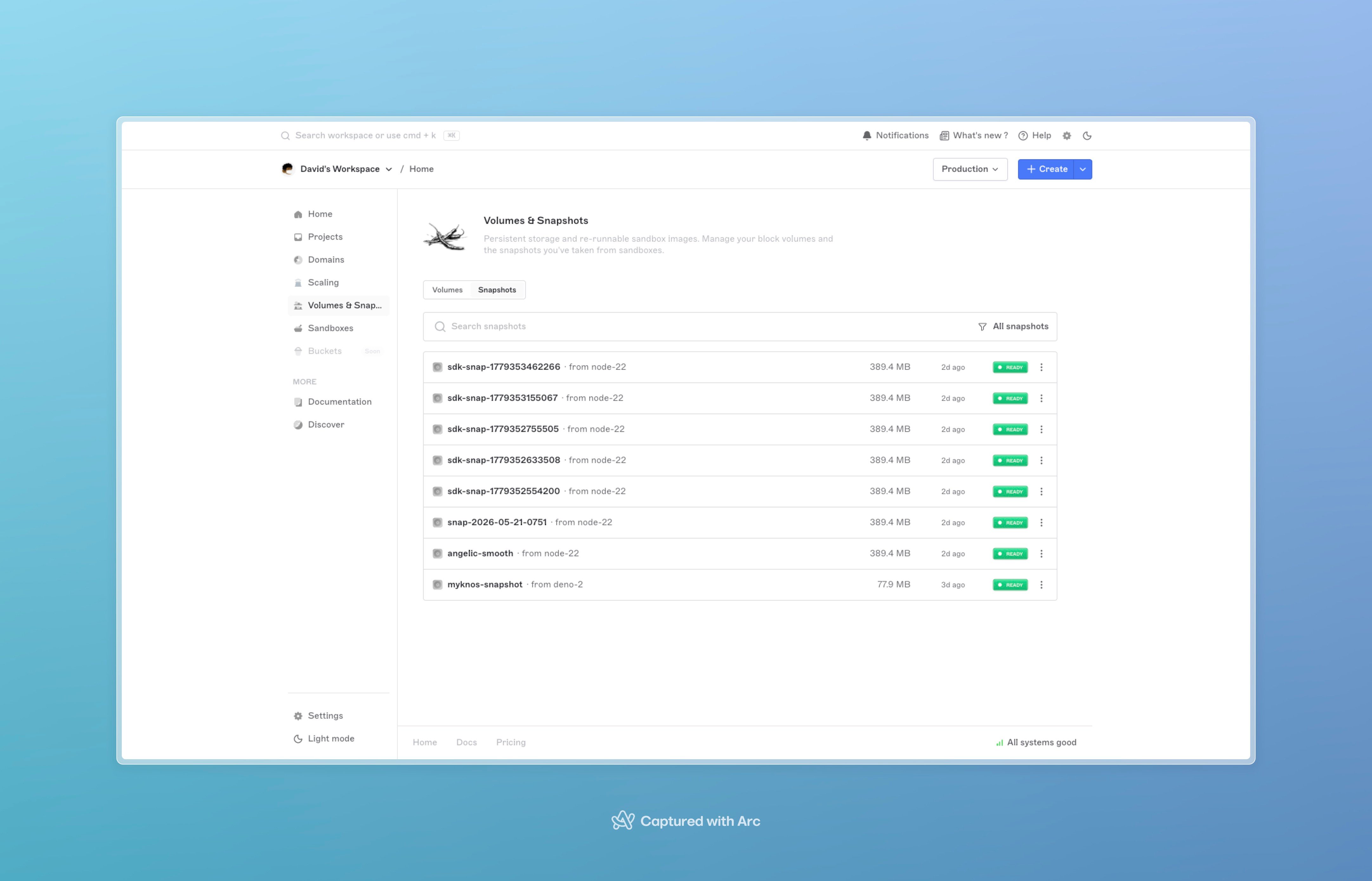
Two views, depending on scope:
```typescript TypeScript theme={null}
// Every snapshot you own across all sandboxes, paginated
const all = await client.snapshots.listAll({ page: 1, limit: 50 });
// Just the snapshots from one sandbox
const mine = await handle.snapshots.list({ page: 1, limit: 50 });
```
```python Python theme={null}
# Every snapshot you own across all sandboxes
all_snaps = client.snapshots.list_all({"page": 1, "limit": 50})
# Just the snapshots from one sandbox
mine = sandbox.list_snapshots({"page": 1, "limit": 50})
```
```go Go theme={null}
// Every snapshot you own across all sandboxes
all, _ := client.Snapshots.ListAll(ctx, sandbox.Pagination{Page: 1, Limit: 50})
// Just the snapshots from one sandbox
mine, _ := handle.ListSnapshots(ctx, sandbox.Pagination{Page: 1, Limit: 50})
```
Each snapshot exposes `id`, `name`, `source_template`, `status`, `created_at`, and `sandbox_id`. The image bytes themselves aren't downloadable; snapshots are restore-only.
## Deleting snapshots
```typescript TypeScript theme={null}
await client.snapshots.delete(snapshotId);
```
```python Python theme={null}
client.snapshots.delete(snapshot_id)
```
```go Go theme={null}
_ = client.Snapshots.Delete(ctx, snapshotID)
```
Deletion is **permanent**. The snapshot's underlying image is removed; restore stops working immediately for anyone holding the ID.
**Snapshot deletion can't be undone.** There's no soft-delete. Sandboxes already restored from the snapshot keep running, but you can't restore the same snapshot again. If the snapshot is your only copy of important state, take a fresh one before deleting.
## Retention and expiry
Each snapshot has an `expires_at` timestamp set at creation. A background reaper runs hourly and deletes snapshots whose `expires_at` has passed. The retention window depends on your plan and account configuration; check **Billing → Limits** to see your current snapshot retention.
Restoring from a snapshot does **not** extend its expiry. If you want to keep a baseline indefinitely, take a fresh snapshot from the restored sandbox before the original expires.
## Billing
Snapshots count against your account's compute-storage usage for the time they're held. Storage charges are visible under **Billing → Usage**. Deletion stops the billing immediately.
Restoring isn't free either: the new sandbox bills from the moment it goes `ready`, like any other sandbox. The snapshot itself stays billable separately.
## Failure modes
| Failure | What happens | What to do |
| ----------------------------------------- | ---------------------------------------- | ------------------------------------------------------------------------------------------------------- |
| Snapshot build fails | Status flips to `failed`; no auto-retry | Delete the failed snapshot, take a fresh one from a `ready` sandbox. |
| Snapshot expired before you restored | Restore call returns `not found` | Take snapshots more frequently, or extend retention via plan upgrade. |
| Snapshot deleted while you were restoring | Restore fails partway with a clear error | Don't delete snapshots in flight; deletion is final but waits for in-flight restores to complete first. |
| Concurrent snapshots requested | Second request is rejected | Wait for the in-flight snapshot to finish (`ready` or `failed`), then retry. |
## Next steps
* [SDKs](sdks), the full reference, including snapshot helpers on the handle and at the client level.
* [Sandboxes overview](overview), lifecycle and operations.
* [Sandbox internals](sandbox-system), how snapshot images are stored and restored.
## Listing snapshots
Two views, depending on scope:
```typescript TypeScript theme={null}
// Every snapshot you own across all sandboxes, paginated
const all = await client.snapshots.listAll({ page: 1, limit: 50 });
// Just the snapshots from one sandbox
const mine = await handle.snapshots.list({ page: 1, limit: 50 });
```
```python Python theme={null}
# Every snapshot you own across all sandboxes
all_snaps = client.snapshots.list_all({"page": 1, "limit": 50})
# Just the snapshots from one sandbox
mine = sandbox.list_snapshots({"page": 1, "limit": 50})
```
```go Go theme={null}
// Every snapshot you own across all sandboxes
all, _ := client.Snapshots.ListAll(ctx, sandbox.Pagination{Page: 1, Limit: 50})
// Just the snapshots from one sandbox
mine, _ := handle.ListSnapshots(ctx, sandbox.Pagination{Page: 1, Limit: 50})
```
Each snapshot exposes `id`, `name`, `source_template`, `status`, `created_at`, and `sandbox_id`. The image bytes themselves aren't downloadable; snapshots are restore-only.
## Deleting snapshots
```typescript TypeScript theme={null}
await client.snapshots.delete(snapshotId);
```
```python Python theme={null}
client.snapshots.delete(snapshot_id)
```
```go Go theme={null}
_ = client.Snapshots.Delete(ctx, snapshotID)
```
Deletion is **permanent**. The snapshot's underlying image is removed; restore stops working immediately for anyone holding the ID.
**Snapshot deletion can't be undone.** There's no soft-delete. Sandboxes already restored from the snapshot keep running, but you can't restore the same snapshot again. If the snapshot is your only copy of important state, take a fresh one before deleting.
## Retention and expiry
Each snapshot has an `expires_at` timestamp set at creation. A background reaper runs hourly and deletes snapshots whose `expires_at` has passed. The retention window depends on your plan and account configuration; check **Billing → Limits** to see your current snapshot retention.
Restoring from a snapshot does **not** extend its expiry. If you want to keep a baseline indefinitely, take a fresh snapshot from the restored sandbox before the original expires.
## Billing
Snapshots count against your account's compute-storage usage for the time they're held. Storage charges are visible under **Billing → Usage**. Deletion stops the billing immediately.
Restoring isn't free either: the new sandbox bills from the moment it goes `ready`, like any other sandbox. The snapshot itself stays billable separately.
## Failure modes
| Failure | What happens | What to do |
| ----------------------------------------- | ---------------------------------------- | ------------------------------------------------------------------------------------------------------- |
| Snapshot build fails | Status flips to `failed`; no auto-retry | Delete the failed snapshot, take a fresh one from a `ready` sandbox. |
| Snapshot expired before you restored | Restore call returns `not found` | Take snapshots more frequently, or extend retention via plan upgrade. |
| Snapshot deleted while you were restoring | Restore fails partway with a clear error | Don't delete snapshots in flight; deletion is final but waits for in-flight restores to complete first. |
| Concurrent snapshots requested | Second request is rejected | Wait for the in-flight snapshot to finish (`ready` or `failed`), then retry. |
## Next steps
* [SDKs](sdks), the full reference, including snapshot helpers on the handle and at the client level.
* [Sandboxes overview](overview), lifecycle and operations.
* [Sandbox internals](sandbox-system), how snapshot images are stored and restored.