
When to use a sandbox
- Running untrusted or AI-generated code without it touching your laptop.
- Spinning up a remote dev environment from a template (Node, Python, etc.) for a quick experiment.
- One-shot data jobs: process a file, run a model, generate a report, exit.
- Long-running interactive tasks where you want to pause, walk away, and resume tomorrow without losing state.
- Hosting per-user execution environments for an app you’re building (think coding playgrounds, AI agents, evaluation pipelines).
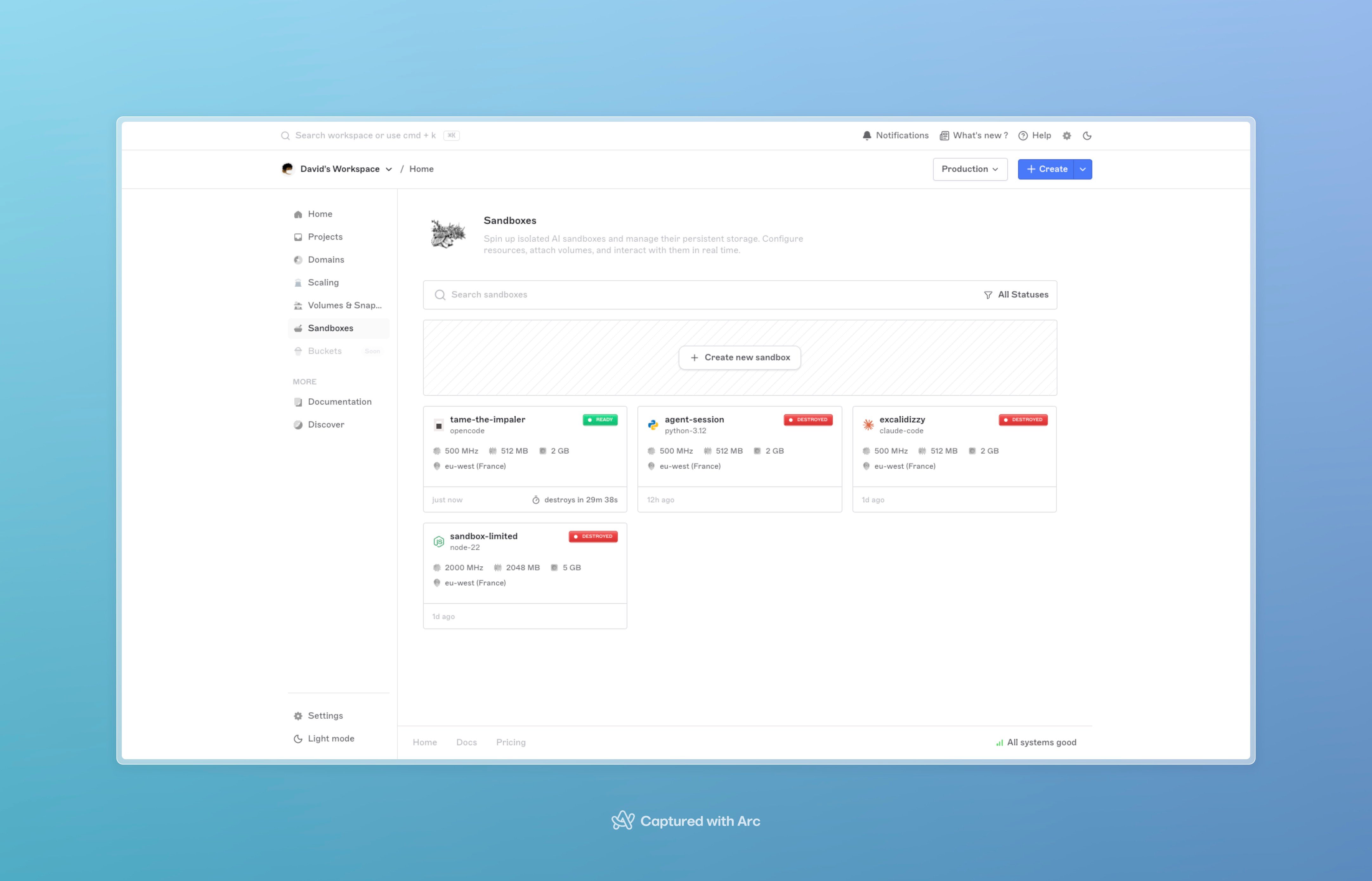
The Sandboxes tab in the dashboard, with status chips, region, template, and the New sandbox button.
Templates
A sandbox starts from a template, a preconfigured base image with a runtime (and, in some cases, an AI coding agent) already installed. You pick the template at creation by passing itsname. If you don’t pass one, you get the platform default.
Language runtimes
AI coding agents
These come with the agent already installed and configured to run autonomously inside the sandbox, useful for delegating coding tasks to an agent loop.Get the live list
The template catalog is updated by the Brimble team without warning, new templates appear, and stale ones are deprecated. Pull the authoritative current list from the SDK:Lifecycle
A sandbox moves through a small state machine:starting, provisioning is in flight. Operations that need a live sandbox (exec, file ops,pause) are rejected.ready, the container is up; you can exec, write files, snapshot, or pause.paused, the container is scaled to zero. CPU and memory billing stops. Persistent volumes (if any) stay attached.resuming/pausing, transient transitions; brief.destroyed, terminal. The sandbox is gone; persistent volumes (if any) are detached, not deleted.failed, provisioning hit an error and the sandbox can’t be used. Destroy it and create a new one.
POST /sandboxes blocks until the sandbox is ready (~2–3s typical) and returns status: "ready". You can call exec and other runtime operations immediately. Pause, resume, and destroy still transition asynchronously — poll the detail endpoint or watch the dashboard for those.
Operations you can run
Once a sandbox isready, the SDK exposes one method per operation. All three SDKs (TypeScript, Python, Go) share the same surface.
Start with the SDKs. If you have to call the API directly (a runtime without an SDK, debugging, scripting from a shell), the Sandbox API tab has the raw REST contract for every endpoint.
Resource sizing
You pick CPU, memory, and ephemeral scratch disk per sandbox:- CPU, Nomad MHz units; ranges from light (1 share) up to a few thousand MHz.
- Memory, megabytes; ranges from 1 MB up to 2 GB.
- Disk, ephemeral scratch space in GB; 1 to 5 GB.
Persistence
By default a sandbox is fully ephemeral: when it’s destroyed, everything written to disk is gone. Two opt-in patterns add durability:persistent: true+persistentDiskGB, provisions a fresh persistent volume (10 to 50 GB) mounted at the sandbox’s workspace directory. The volume survives pause and is detached (not deleted) on destroy.volumeId, attaches an existing detached volume you’ve used before. Useful for resuming work on the same files from a fresh sandbox.
Auto-destroy
You can ask Brimble to destroy a sandbox automatically when it stops being useful:autoDestroy: true+destroyTimeout, destroy after a fixed wall-clock window. Allowed values:30m,1h,3h,6h,12h,18h.oneShot: true, destroy when the sandbox’s main process exits. Good for one-off scripts.- Every sandbox also has a hard max-lifetime ceiling set at the platform level; sandboxes that hit it are destroyed regardless of
autoDestroy.
expires_at field shows when it’ll auto-destroy if nothing intervenes.
Network egress
Sandboxes get a normal outbound network by default: they cancurl, install dependencies, and hit third-party APIs. For workloads you don’t fully trust (AI-generated code, public dev environments), Brimble lets you control outbound traffic with three egress modes:
Set egress at create time with the
egress object, or change it later with PUT /sandboxes/{id}/egress (SDK: handle.updateEgress(...)). Switching between open, deny_all, and restricted may reattach the sandbox to a different network profile; the update response includes network_updated: true when that happens. Allow a few seconds for the new policy to take effect before probing from inside the sandbox.
blockOutbound: true at create time maps to deny_all. Prefer the egress object for new code; you cannot combine egress and blockOutbound on the same request.
See SDKs → Network egress for the full SDK surface and Update sandbox egress for the REST contract.
Streaming exec output
By default,exec and runCode buffer output and return the full result when the command finishes. For long-running commands (installs, agent loops, build steps), pass stream: true to receive stdout and stderr as Server-Sent Events (text/event-stream) while the command runs.
Each SDK wraps the SSE stream in an ExecStream object you can iterate live, then call .result() for the final aggregated stdout, stderr, exit_code, and duration_ms. Alternatively, pass onStdout / onStderr callbacks on a normal exec call and the SDK streams under the hood but still returns a buffered ExecResult.
runCode streaming, and raw SSE frame access.
Billing and plan caveats
- Each running sandbox bills sandbox CPU/memory usage for the time it’s
readyorresuming(with plan-included allowances applied). Paused sandboxes stop sandbox CPU/memory billing; snapshot storage and persistent volumes bill separately at storage rates. - Free plan accounts have a small sandbox quota and can only create sandboxes in regions marked free; paid regions are rejected at create time with a clear error.
- Each plan has a maximum concurrent sandbox count. Once you hit it, new create requests are rejected until you destroy one.
- A workspace-level spending limit (set under Billing → Limits) can pause sandbox creation entirely. The limit applies platform-wide, so if you hit it, every new sandbox is rejected with a “spending limit reached” error until you raise the limit or the cycle rolls over.
Next steps
- SDKs, full reference for the TypeScript, Python, and Go SDKs.
- Quickstart, create your first sandbox in five minutes.
- Snapshots, save and restore sandbox state.
- Cookbook — untrusted code, AI agents, Docker inside a sandbox, persistent dev environments.
- Inside the Brimble Sandbox runtime, how Brimble provisions and manages sandboxes underneath.