
CI runners are being rolled out. If CI runners isn’t in your dashboard sidebar, it isn’t enabled for your account yet.
Before you start
- A GitHub organization. CI runners work for repositories owned by an organization. Repositories under a personal GitHub account can’t use them.
- The Brimble GitHub App installed on that organization and connected to your Brimble account. This is the same app you use to deploy from GitHub. See Git integrations.
- The app’s runner permission accepted. The app asks the organization for permission to manage its self-hosted runners. An organization owner accepts it in GitHub under Settings, GitHub Apps, Review request next to the Brimble app. Until it’s accepted, jobs stay queued in GitHub.
Choose how jobs run
A runner works in one of two ways. You pick when you create it and can switch later while no sandboxes are attached.Create a runner
- In the dashboard, open CI runners and click New runner.
- Pick the GitHub organization and give the runner a name.
- Under How jobs run, choose Long-lived sandboxes or Fresh sandbox per job.
- Fill in the section that matches your choice (below), then create the runner.
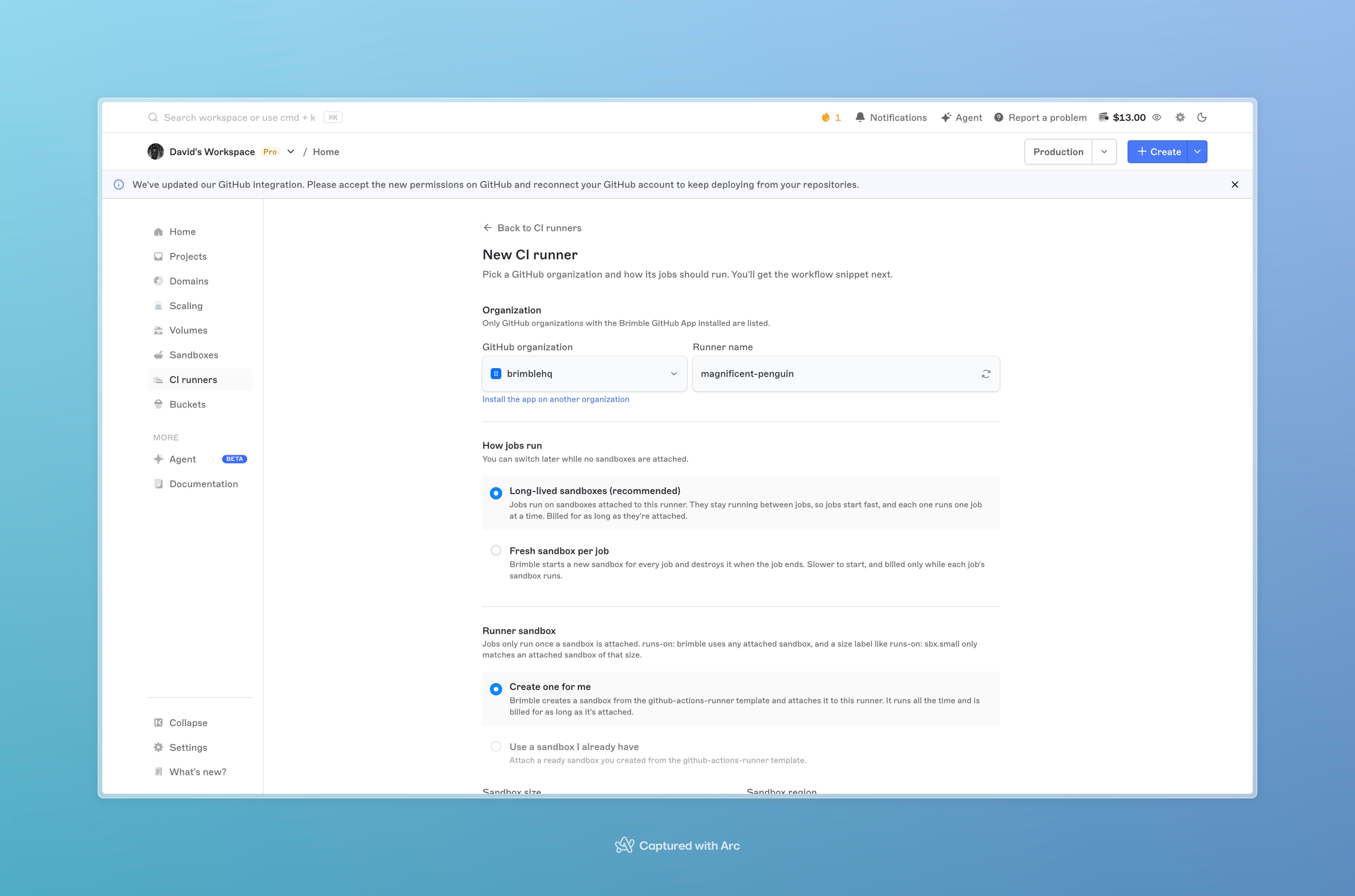
The New CI runner form with an organization picked, long-lived sandboxes selected, and a runner sandbox set to be created.
Long-lived sandboxes
Under Runner sandbox, choose where the jobs run:- Create one for me. Pick a Sandbox size and Sandbox region. Brimble creates a sandbox for the runner and attaches it.
- Use a sandbox I already have. Pick a ready sandbox that you created from the
github-actions-runnertemplate. Its size and region are used as they are.
Fresh sandbox per job
Pick the Sandbox size and Sandbox region that each job’s sandbox uses, and set Max concurrent jobs. When more jobs are queued than that, the extra jobs wait in GitHub’s queue until a slot frees up.Use the runner in a workflow
Setruns-on in any workflow in the organization:
- Long-lived sandboxes:
brimbleuses any attached sandbox. A size label only matches an attached sandbox of that size, soruns-on: sbx.smallwaits until a small sandbox is attached and free. - Fresh sandbox per job:
brimbleuses the runner’s size. A size label starts a sandbox of that size for the job.
ubuntu-latest, are left for GitHub’s own runners.
What a job can use
The runner sandbox comes with common toolchains already installed:
Actions that download a tool into the job’s workspace, such as
actions/setup-node, work as usual. Installing packages for your own user works too: npm install -g, pip install, gem install and cargo install all write to locations the job can use.
Jobs can’t install system packages with apt-get, and they can’t run Docker. If a job needs a tool that isn’t listed, download it in a step or use an action that sets it up.
Pick a size that fits the work. The smallest size is fine for linting and light scripts. Builds and test suites run noticeably faster on a larger one.
Manage sandboxes on a long-lived runner
Open the runner. Attached sandboxes on its overview shows what’s attached and whether each one is online in GitHub.- Attach sandbox adds another sandbox, so more jobs can run at the same time.
- Detach stops the runner in that sandbox and removes it from GitHub. The sandbox itself is not deleted, and it goes back to its normal expiry.
See your jobs
The Jobs tab on a runner lists the GitHub Actions jobs that asked for it, newest first, with the repository, the job name, its status, and the sandbox it ran on. Open a job in GitHub to read its logs.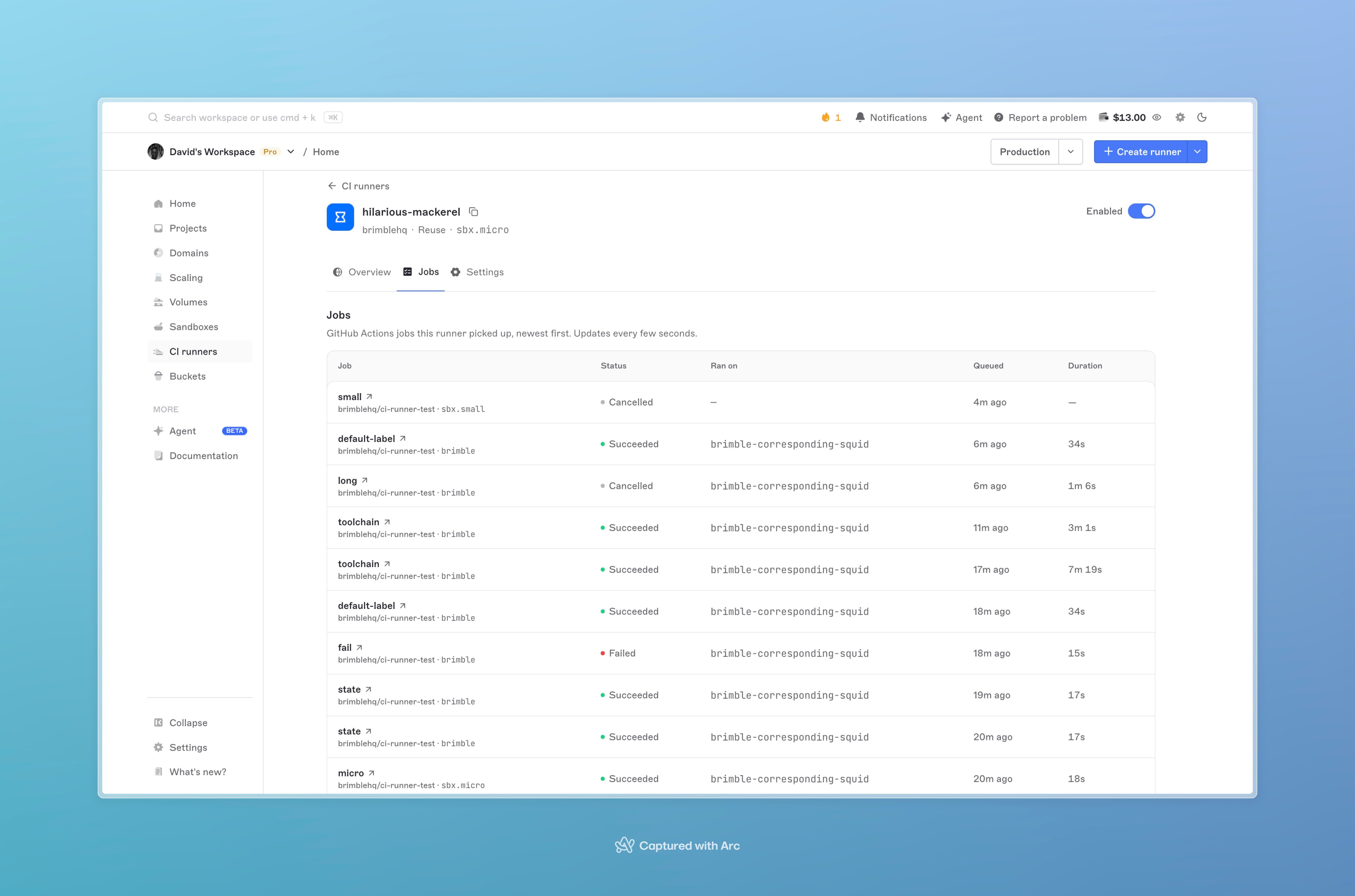
The Jobs tab of a runner, listing each job with its repository, label, status, the runner sandbox it ran on, and how long it took.
Disable or delete a runner
Both are in the runner’s Settings. Disable runner detaches every attached sandbox and stops Brimble running jobs for the organization. Delete runner does the same and removes the runner. Neither deletes your sandboxes. Jobs that still sayruns-on: brimble after that stay queued in GitHub, so change those workflows back first.
Troubleshooting
A job stays queued in GitHub and never shows up under Jobs. The organization hasn’t accepted the Brimble app’s runner permission. An organization owner can accept it in GitHub under Settings, GitHub Apps. A job stays queued on a long-lived runner. Check Attached sandboxes on the runner. The job needs an attached sandbox that is online and not already running another job. If the workflow uses a size label, an attached sandbox must have that size. Jobs from a public repository stay queued. GitHub doesn’t send jobs from public repositories to an organization’s runners unless the organization allows it. An owner can change this in GitHub under Settings, Actions, Runner groups, by allowing public repositories on the default group. Attaching a sandbox fails. The sandbox must be ready and created from thegithub-actions-runner template. A sandbox that was created some time ago may predate runner support. Choose Create one for me to get a new one.